Page 98 of 308

To Resume a Set Speed
Suppose you set your Cruise Control at a desired speed
and then you apply the brake. This, of course, shuts
off
the Cruise Control. But you don’t need to reset it.
Once you’re going
about
25 mph (40 h/h)
or more, you can move
the Cruise Control
switch from
“ON”
to “R/A”
(Resume/Accelerate)
for about half a second.
To Increase Speed While Using Cruise
Control
There are two ways to go to a higher speed. Here’s the first:
1. Use the accelerator pedal to get to the higher speed.
2. Push the SET button at
the end
of the lever,
then release the button
and
the accelerator
pedal. You’ll now cruise
at the higher speed.
You’ll
go right back up to your chosen speed and stay there. <
Remember, if you hold the switch at “R/A” longer than
half
a second, the vehicle will keep going faster until
you release the switch or apply the brake. You could be
startled and even lose control.
So unless you want to go
faster, don’t hold the switch at
“R/A.”
Here’s the second way to
go to a higher speed:
1. Move the Cruise switch
from “ON” to “R/A.”
Hold
it there until you
get up to the speed you
want, and then release
the switch.
96
ProCarManuals.com
Page 99 of 308

2. To increase your speed in very small amounts, move
the switch to
“R/A” for less than half a second and
then release it. Each time
you do this, your vehicle
will go
1 mph (1.6 km/h) faster. If you tap “R/A”
five times, you will go 5 mph faster.
The accelerate feature will only work after you have
set
the Cruise Control speed by pushing the SET button.
To Reduce Speed While Using Cruise
Control
There are two ways to reduce your speed while using
cruise control:
Push in the SET button
at the end of the lever
until
you reach the
lower speed
you want,
then release
it.
2. To slow down in very small amounts, push the
button for less than half a second. Each time you do
this,
you’ll go 1 mph (1.6 km/h) slower. If you tap
SET five times,
you will go 5 mph slower.
Passing Another Vehicle While Using
Cruise Control
Use the accelerator pedal to increase your speed. When
you take your foot off the pedal, your vehicle will slow
down
to the Cruise Control speed you set earlier.
Using Cruise Control on Hills
How well your Cruise Control will work on hills
depends upon your speed, load, and the steepness of the
hills. -When going up steep hills, you may have
to step
on the accelerator pedal to maintain your speed. When
going downhill, you may have
to brake or shift to a
lower gear
to keep your speed down. Of course,
applying the brake takes
you out of Cruise Control.
Many drivers find this to be too much trouble and don’t
use Cruise Control on steep hills.
97
ProCarManuals.com
Page 100 of 308
To Get Out of Cruise Control
There are two ways to turn
off the Cruise Control:
-
1. Step lightly on the brake
pedal,
OR
2. Move the Cruise switch
to
“OFF.”
To Erase Speed Memory
When you turn off the Cruise Control or the ignition,
your Cruise Control set speed memory is erased.
Lights
I These switches control the
following light systems:
Headlights
Parking Lights
Side Marker Lights
Taillights
License Plate Lights
Instrument Panel Lights
To turn on the headlights, press the switch with the light
symbol.
Press the switch marked
“P’ to turn on the parking
lights.
Press
“OFF” to turn off all lights.
98
ProCarManuals.com
Page 101 of 308

Interior/Instrument Panel Lights
You can brighten or dim the
instrument panel lights by
rotating the control up or
down. To turn on the
interior courtesy lights,
rotate the control all the
way up to
“HI.”
Headlight ccOn99 Warning
If you open the door while leaving the lights on, you
will hear
a warning chime.
Daytime Running Lights (Canada Only)
The Canadian Federal Government has decided that
“Daytime Running Lights” (DRL) are a useful feature,
in that DRL can make your vehicle more visible to
pedestrians and other drivers during daylight hours.
DRL are required on new vehicles sold in Canada.
Your DRL work with a light sensor on top of the
instrument panel. Don’t cover it up.
The low beam headlights will come on at reduced
brightness in daylight when:
0 the ignition is on,
0 the headlight switch is off, and
0 the parking brake is released.
At dusk, the exterior lights will come on automatically
and the low beams will change to full brightness. At
dawn, the exterior lights will go out and the low beams
will change to the reduced brightness
of DRL (if the
headlight switch is off).
99
ProCarManuals.com
Page 102 of 308
Of course, you may still turn on the headlights any time
you need to.
To idle your vehicle with the DRL off, set the parking
brake while the ignition
is in the “Off’ or “Lock”
position. Then start the vehicle. The
DRL will stay off
until you release the parking brake.
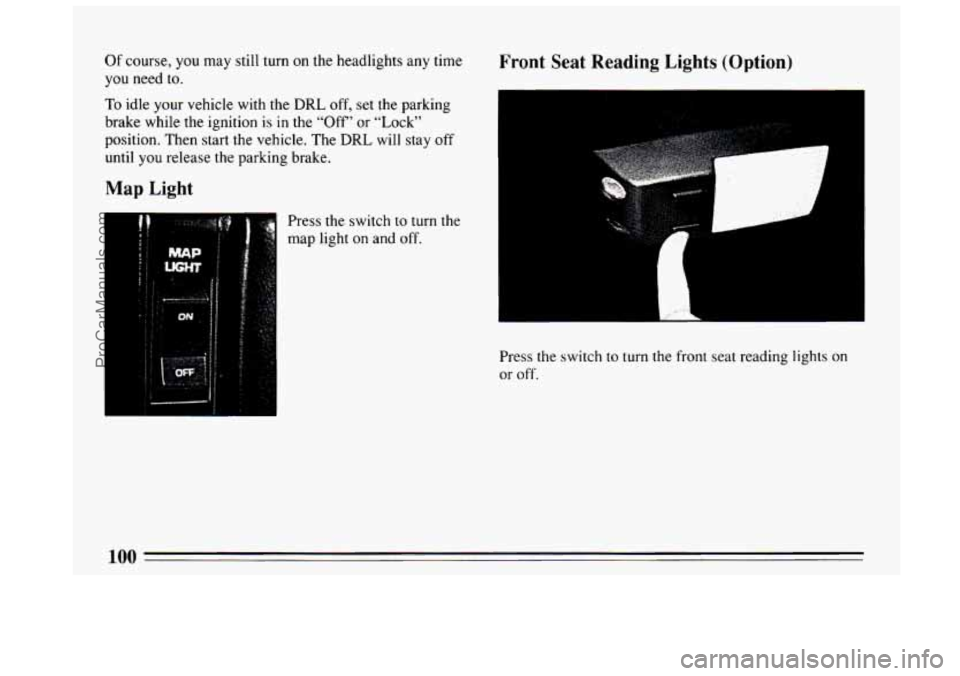
Press the switch to turn the
map light on and off.
Front Seat Reading Lights (Option)
.. . , ..
L
Press the switch to turn the front seat reading lights on
or off.
100
ProCarManuals.com
Page 114 of 308
dangerous. So please get to know your warning lights
and gages. They’re a big help.
Fuel Gage
I
Your fuel gage tells
you about how much
fuel you have left,
when
the ignition is on.
When the indicator
nears
“E” (Empty), you
still have a little fuel
left, but you should get
more soon. Here
are four things that some owners ask about. None
of these show a problem with your fuel gage and are
normal operating characteristics:
0
0
0
0
At the service station, the gas pump shuts off before
the gage reads
“F” (Full).
It takes a
little more or less fuel to fill up than the
gage indicated. For example,
the gage may have
indicated the tank was half
full, but it actually took a
little more or less than half the tank’s capacity to
fill
the tank.
The gage moves a little when you
turn a corner,
speed up or brake.
The gage doesn’t go back to
“E” when you turn off
the ignition.
112
ProCarManuals.com
Page 115 of 308

Brake System Warning Light
BRAKE
If the light comes on while you are driving, pull off the
road and stop carefully. You may notice that the pedal
is
Your Buick’s hydraulic harder to push. Or, the pedal may go closer to the floor.
brake system is divided into It may take longer to stop. If the light is still on, or if the
two parts. If one part isn’t
anti-lock brake system warning light is flashing, have
working, the other part can the vehicle towed for service. (See “Anti-Lock Brake
still work and stop you. For
good braking, though, you
need both parts working
well.
If the warning light comes on, there cou Ild
be a brake
problem. Have your brake system inspected right away. System
Warning Light” and “Towing Your Buick” in the
Index.)
This light should come on as you start the vehicle. If it
doesn’t come on then, have it fixed
so it will be ready to
warn you if there’s a problem.
The brake system warning light will also come on when
you set your parking brake, and it will stay on if your
parking brake doesn’t release fully. If it stays on after
your parking brake is fully released,
it means you have a
brake problem.
113
ProCarManuals.com
Page 116 of 308

I
Anti-Lock Brake SJ
ANTI-
LOCK
‘S tern Warning’Light
With anti-lock, this
light will come on
when you start your
engine and it will stay
on for three seconds.
That’s normal.
If the
light doesn’t come on,
have it fixed
so it will
be ready to warn you if
there is a problem.
If the anti-lock brake system warning light stays on
longer than normal after you’ve started your engine, turn
the ignition off. Or, if the light comes on and stays on
when you’re driving, stop as soon as possible and turn
the ignition
off. Then start the engine again to reset the
system. If the light still stays on, or comes on again
while you’re driving, your Buick needs service.
If the
light is on but not flashing and the regular brake system
warning light isn’t on, you still have brakes, but you
don’t have anti-lock brakes.
If
the light flashes when you’re driving, you don’t have
anti-lock brakes and there’s a problem with your regular
brakes. Pull off the road and stop carefully. You may
notice that the pedal is harder to push. Or, the pedal may
go closer to the floor. It may take longer to stop. Have
the vehicle towed
for service. (See “Towing Your
Buick” in the Index.)
114 1
I
ProCarManuals.com