1993 PONTIAC GRAND-PRIX radio
[x] Cancel search: radioPage 48 of 338

and then press DOOR within 40
seconds, the interior lights will stay on
until the 40 seconds are over.
Press
a to unlock the trunk. Your
interior lights will not come
on.
Matching Transmitter(s) To Your
Vehicle
Each key chain transmitter is coded to
prevent another transmitter from
unlocking your vehicle.
If a transmitter
is lost or stolen, a replacement can be
purchased through your dealer.
Remember to bring the remaining
transmitter with you when you go to
your dealer. When the dealer matches
the replacement transmitter to your
vehicle, the remaining transmitter must
also be matched. Once the new
transmitter is coded, the lost
transmitter will not unlock your vehicle.
You can match a transmitter to as many
different vehicles as you
own, provided
they are equipped with exactly the same
model system. (General Motors offers
several different models of these
systems on their vehicles.) Each vehicle
can have only two transmitters matched
to it. See your dealer to match
transmitters to another vehicle.
Your Remote Lock Co~ntrol operates
on
a radio frequency subject to Federal
Communications Commission (FCC)
Rules.
This device complies with Part
15 of the
FCC Rules. Operation is subject to the
following two conditions:
(1) This
device may not cause harmful
interference, and
(2) This device must
accept any interference received,
including interference that may cause
undesired operation. Should interference
to this system
occur, try this:
Check to determine if battery
replacement is necessary. See the
instructions
on battery replacement
later in this section.
Check the distance. You may be too
far from your vehicle. This product
has a maximum range.
Check the location. Other vehicles or
objects may be blocking the signal.
See your Pontiac dealer or a qualified
technician for service.
Changes or modifications to this system
by other than an authorized service
facility could void authorization to
use
this equipment.
ProCarManuals.com
Page 53 of 338

Features & Controls
Qnifion Switch
Nith the ignition key in the ignition
;witch, you can turn the switch to five
~ositions:
kccessory: An “on” position in which
rou can operate your radio and
vindshield wipers. Press in the ignition
;witch as you turn the top of it toward
Lock: The only position in which you
:an remove the key. This locks your
;teering wheel, ignition and transaxle.
TOU.
Off: Unlocks the steering wheel,
ignition, and transaxle, but does not
send electrical power to any accessories,
Use this position if your vehicle must
be
pushed or towed, but never try to push-
start your vehicle.
Run: An “on” position to which the
switch returns after you start your
engine and release the switch. The
switch stays in the
Run position when
the engine is running. But even when
the engine is not running, you can use
Run to operate your electrical power
accessories, and to display some instru-
ment panel warning lights.
Start: Starts the engine. When the
engine starts, release the key. The
ignition switch will return to
Run for
normal driving.
Note that even
if the engine is not
running, the positions
Accessory and
Run are “on” positions that allow you
to operate your electrical accessories,
such
as the radio.
ProCarManuals.com
Page 102 of 338
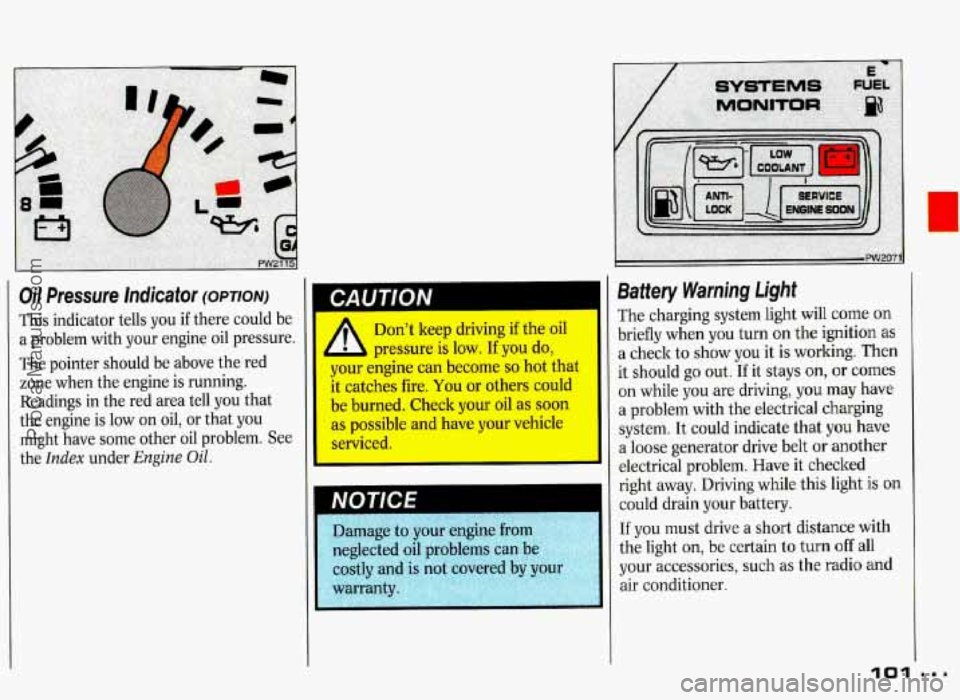
Oil Pressure Indicator (OPTION)
This indicator tells you if there could be
a problem with your engine oil pressure.
The pointer should be above the red
zone when the engine is running.
I CAUTION
Readings in the red area tell you that
the engine is low on oil, or that you
might have some other oil problem. See
the
Index under Engine Oil.
Don't keep driving if the oil
pressure is low.
If you do,
your engine can become
so hot that
it catches fire, You or others could
be burned. Check your oil as soon
as possible and have your vehicle
serviced.
Battery Warning Light
The charging system light will come on
briefly when you turn on the ignition
as
a check to show you it is working. Then
it should go out.
If it stays on, or comes
on while you are driving, you may have
a problem with the electrical charging
system. It could indicate that
you have
a loose generator drive belt
or another
electrical problem. Have it checked
right away. Driving while this light
is on
could drain your battery.
If you must drive a short distance with
the light
on, be certain to turn off all
your accessories, such as the radio and
air conditioner.
101
ProCarManuals.com
Page 110 of 338

Compass
The compass shows the direction your
vehicle is facing whenever the engine is
running. For best accuracy, it should be
calibrated:
Whenever it displays the message
“CALIBRAT/COMPASS”
Whenever it doesn’t seem to be
showing the correct direction.
Mobile telephones, two-way radios,
and other electronic devices can
cause inaccurate compass readings
if they are placed near the
compass, and
you may need to
recalibrate the compass.
To Calibrate the Compass:
1. Drive to an open area, like a large
empty parking lot.
You need to be
able to drive safely
in circles. Be sure
the place is not only free
of other
vehicles but also away from power
lines or large metal buildings.
2. With the engine running and all
accessories
off, press CAL. The word
“CALIB” will appear.
3. Be sure there’s no traffic, then slowly
drive in a circle. Don’t
go faster than
5 mph (8 ldh), because the vehicle
needs to stay level. The compass will
orient itself.
4. When the compass is oriented, the
word “CALSET” will appear. Locate
north and point the front
of the
vehicle at north.
5. Press NORTH. The words “N SET”
will appear. Your compass is now
calibrated.
If you travel more than 500 miles
(804 km) east or west, you can quickly
recalibrate
to compensate for variations
in the earth’s magnetic field. Simply
point the front of the vehicle at true
north and press
NORTH.
log...
ProCarManuals.com
Page 116 of 338

Part 3
Comfort Controls &
Audio Systems
1 n this part you'll find out how to
operate the comfort control systems
and audio systems offered with your Pontiac
. Be sure to read about the
particular system supplied with your
vehicle
.
Climate Control ........................................................................\
............................... 116
Setting the Clock ........................................................................\
............................. 120
AM/FM Stereo Radio ........................................................................\
...................... 122
AM/FM Stereo Radio with Cassette Player ........................................................... 124
ETR AM/FM Stereo Radio with Cassette Player and Equalizer ........................... 126
AM/FM Stereo with Compact Disc Player ............................................................. 128
Steering Wheel Controls for Audio System ............................................................ 131
Understanding Radio Reception ........................................................................\
..... 133
Care of Your Cassette Tape Player ........................................................................\
. 133
Fixed Mast Antenna 134
Power Antenna Mast Care 135
CD Player Anti-Theft
Feature
........................................................................\
......... 130
Gain Control ........................................................................\
.................................... 132
Care of Your Compact Discs ........................................................................\
........... 134
........................................................................\
........................
........................................................................\
..............
115
ProCarManuals.com
Page 121 of 338

Comfort Controls & Audio Systems
Audio Sy&ms
The following pges describe the audio
systems available
for your Pmtiac, and
how to get
t.he best performance from
them. Please read about the system in
your vehicle.
II
Before you add any sound
equipment
to1 vour vehide-lik
tapeplayer,
Cb radio, mobile
telephone
or two-way radio-b
sure you can add what you want. If @I I you can, it's very important to do it
may interfere with the operation of I
properly. Added sound e'quipment
your vehicle's engine,
Delco* radio
Io'r other systems,
and even damage
them. And, your vehicle's systems
may interfere with the operatio:
sound equipment that s bl
added improperly.
So, before adding sound
equipment, check with yc dealel
and be sure to check Federal m-
covering mobile radio i 1
telephone units. ., . . .. . .- .
120
I Hearing damage from loud
noises is almost undetectable
until it
is too late. Your hearing can
adapt to higher volumes of sound.
Sound that seems normal can be
loud and
harmful to your hearing.
Take precautions by adjusting the
volume control on
you radio to a
safe sound level before your hearing
adapts to it.
damage:
, To help avoid hearing loss or
U
1. Adjust the volume control to the
lowest
setting.
2. Increase volume slowly until you
hear Cnmfortably ind clearly.
Setting the Clock
No matter which audio system you have
in your vehicle, setting the clock is easy.
ProCarManuals.com
Page 122 of 338
7 SEEK 1
I
12
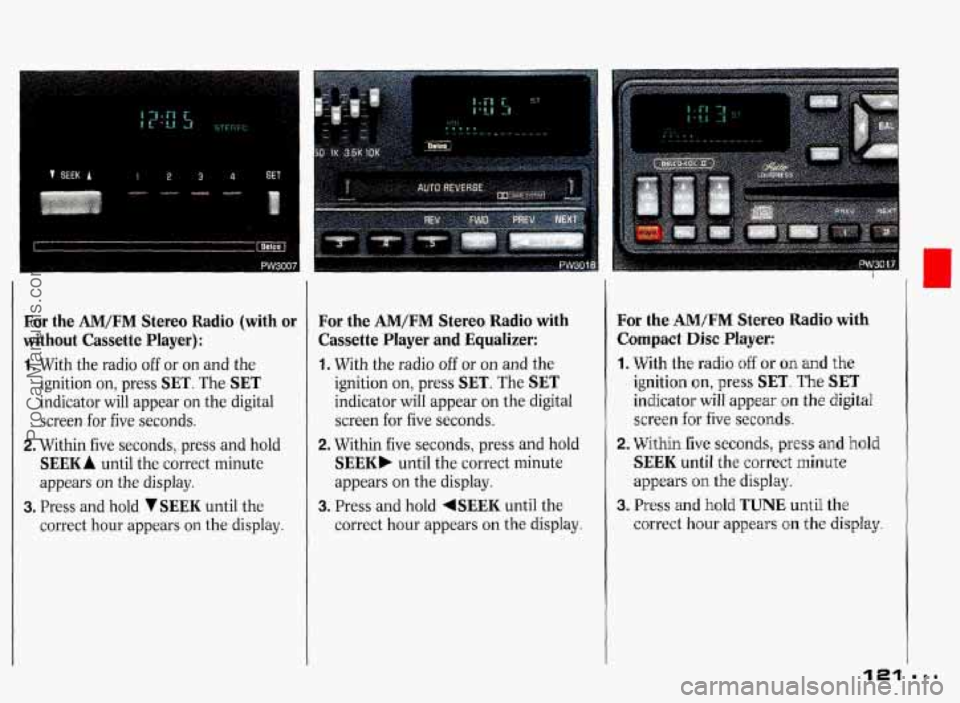
For the AM/FM Stereo Radio (with or
without Cassette Player):
1. With the radio off or on and the
ignition on, press
SET. The SET
indicator will appear on the digital
screen for five seconds.
2. Within five seconds, press and hold
SEEK A until the correct minute
appears on the display.
3. Press and hold VSEEK until the
correct hour appears on the display.
For the AM/FM Stereo Radio with
Cassette Player
and Equalizer:
1. With the radio off or on and the
ignition on, press
SET. The SET
indicator will appear on the digital
screen
for five seconds.
2. Within five seconds, press and hold
SEEK. untiI the correct minute
appears on the display.
3. Press and hold 4SEEK until the
correct hour appears on the display.
For the AM/FM Stereo Radio with
Compact Disc
Player:
1. With the radio off or on and the
ignition on, press SET. The SET
indicator will appear on the digital
screen for five
seconds.
2. Within five seconds, press and hold
SEEK until the correct minute
appears
on the display.
3. Press and hold TUNE until the
correct hour appears on the
display
121
ProCarManuals.com
Page 123 of 338

Comfort Controls & Audio Systems
I
AM/FM Stereo Radio
The digital display indicates information
on time or radio station frequency, the
AM or EM radio band, whether the
station is
in stereo, and other radio
functions.
PWR-VOL (Power-Volume): Turn
the upper knob to turn the radio
on or
off, or to adjust volume. Press it to
change between the clock and the radio
station frequency display when the
radio is
on. Press the knob to display
the time when the ignition is off.
The control ring behind the
PWR-VOL
knob adjusts the left/right speaker
balance.
TUNE: This knob has two functions.
Turn it to the left or right to tune in
radio stations (the radio station
frequency will be displayed
on the
digital screen). Press this hob to
change between the
AM and FM bands.
The control ring behind the
TUNE
knob adjusts the front/rear speaker
balance.
ProCarManuals.com