Page 128 of 324
RCL (Recall): Press once to see which track is playing.
Press again within five seconds to see how long your selection has been playing. The track number
also will be
displayed when the volume is changed or a new track
starts to play.
COMP (Compression): Depressing this button makes
soft and loud passages more equal in volume. Press again
to resume
normal play.
RDM (Random): Press to play tracks in random, rather
than sequential, order.
Press the button again to play tracks sequentially.
REV (Reverse): Press and hold to rapidly back up to a
favorite passage. Release to resume playing.
FWD (Fast Forward): Press and hold to rapidly advance
the disc. Release to resume playing.
PREV (Previous): Press to play a track again. If you
hold or keep pressing the
PREV button, the disc will
keep backing up to previous tracks.
NEX'E Press when you want to hear the next track. If
you hold or keep pressing the
NEXT button, the disc will
keep advancing to other tracks.
SCAN: Press this button to sample each track for
approximately ten seconds.
SCAN will continue until
SCAN is pressed again or another button is pressed.
ProCarManuals.com
Page 129 of 324

When Finished with the Compact Disc Player:
If you press PWR or turn off the ignition, the disc will
stay in the player and
start again when you turn on the
ignition or power switch. The disc will begin playing at
the point where it had been stopped.
ST/PL (Stop/Play): Press to stop the disc player; the
radio will play. Press again to play the disc (the player
will
start playing the disc where it was stopped earlier).
EJCT (Eject): Press to eject the disc; the radio will play.
You can
also eject the disc with the radio or ignition off.
CD Player Anti-Theft Feature
Delco LOC 11 is a security feature for the compact disc
player. It can be used or ignored.
If ignored, the system
plays normally.
If it is used, your player won’t be usable
if it is ever stolen, because it will go to LOC mode any
time battery power is removed. Until an
unLOC code is
entered, it will not turn on.
The instructions below tell you how to enter a secret code
into the system.
If your vehicle loses battery power for
any reason, you must unlock the system with the secret
code before the radio will turn on.
1. Write down any six-digit number and keep it in a safe
2. Turn the ignition to the “Accessory” or “Run” position.
place.
3. Press the PWR button to turn the radio off.
4. Press the 1 and 4 buttons together. Hold them down
until
“- - -” shows on the display. You are ready to
enter your secret code.
ProCarManuals.com
Page 130 of 324
, NOTE: If you allow more than 15 seconds between steps,
you may have
to start the procedure over at step 4.
5.
6.
7.
1
Press SET and O00 will appear on the display.
Press the SEEK, button to make the first number
appear.
Rotate the
TUNE knob right or left to make the last
two numbers agree with your code.
a
9.
10.
Press the lower (BAND) knob and 0o0 will appear
again. Now you are ready
to enter the last three digits
of your code.
Repeat steps
6 and 7 for the last three digits of your
code.
Press the lower
(BAND) knob and rEP will appear
for five seconds and then
OOO will appear.
11. Repeat steps 6 through 10. This time SEC will
amear. indicating that the radio is secure.
To Unlock the System After a Power Loss:
When battery power is reapplied to a secured radio, the
radio won’t turn on and LOC will appear on the display.
Enter your secret code as hllows; pause no more than
15
seconds between steps.
1. Turn the ignition on. (Radio off.)
2. Press the SET button. The display will show 0o0.
3. Enter the six digits of the code following steps 6-9
above. The display will show the numbers as entered.
4. Press the lower (BAND) knob and SEC appears, then
the time, indicating that the disabling sequence was successful.
l28
ProCarManuals.com
Page 131 of 324

Disabling the Anti-Theft System:
1. Press the 1 and 4 buttons together for five seconds
with ignition on and radio power off. The display will
show
SEC, indicating the unit is in the secure mode.
2. Press the SET button. The display will show 0o0.
3. Enter the first three digits of the code following step 6
of the preceding paragraphs. The display will show the
numbers as entered.
4. Press the lower (BAND) knob. The radio will display
OOO.
5. Enter the second three digits of the code. The display
will show the numbers as entered.
6. Press the lower (BAND) knob. If the display shows
‘‘- - - ,” the disabling sequence was successful (the
numbers matched the user-selected code or the factory
back-up code) and the unit is in the
UNSECURED
mode. If the display shows SEC, the disabling
sequence was unsuccessful and the numbers did not
match either. of the codes and the unit will remain in
the
SECURED mode.
Care of Your Cassette Tape Player
A tape player that is not cleaned regularly can cause
reduced sound quality, ruined cassettes, or a damaged
mechanism. Cassette tapes should be stored
in their cases
away from contaminants, direct sunlight, and extreme
heat. If they aren’t, they may not operate properly or
cause failure
of the tape player.
Your tape player should be cleaned regularly each month or after every
15 hours of use. If you notice a reduction in
sound quality,
try a known good cassette to see if the tape
or the tape player is at fault. If this other cassette has n\
o
improvement in sound quality, clean the tape player.
1 /.Y
ProCarManuals.com
Page 233 of 324
2.2L L4 Engine
LOOK
IR THI
LABEL
SAE 1OW-30
AE 5W-31 REFERREI
IF NEITHER SAE 5W-30 NOR SAE 1OW-30 GRADE OILS ARE AVAILABLE, SAE 30 GRADE MAY BE USE0 AT TEMPERATURES
ABOVE 40 DEGREES F (4 DEGREES C).
00 NOT USE SAE 1OW-40, SAE 2OW-50 Ofl ANY nTHFR CRAllF nll Nil1 RFfnMMFNnl
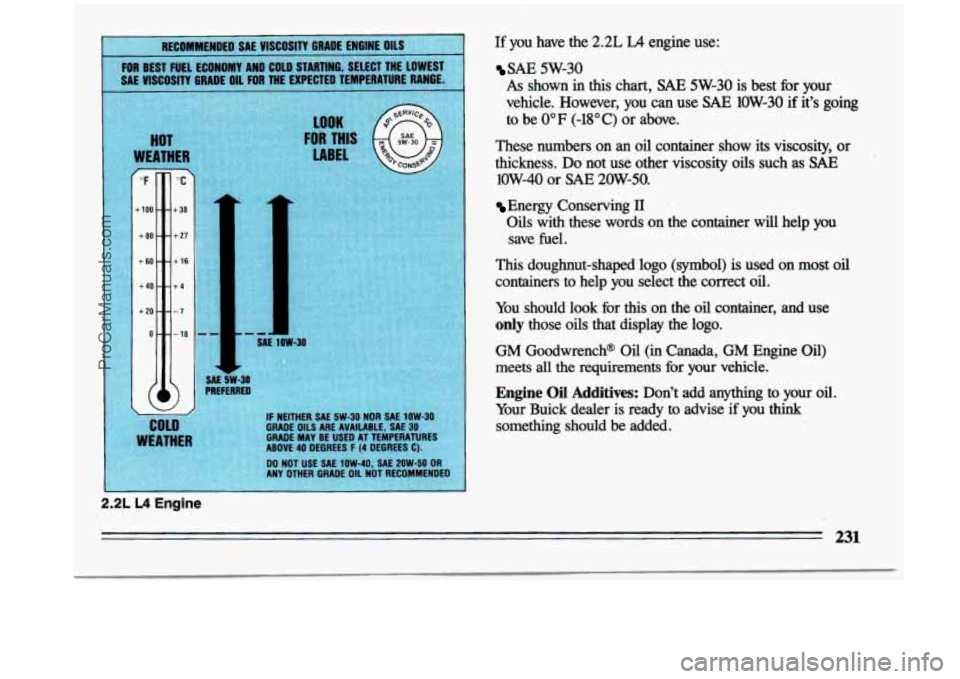
If you have the 2.2L LA engine use:
SAE 5W-30
As shown in this chart, SAE 5W-30 is best for your
vehicle. However, you can use
SAE 1OW-30 if it’s going
to be
0°F (-18°C) or above.
These numbers on
an oil container show its viscosity, or
thickness.
Do not use other viscosity oils such as SAE
low-40 or SAE 20W-50.
Energy Conserving II
Oils with these words on the container will help you save
fuel.
This doughnut-shaped logo (symbol) is used on most oil
containers to help you select the correct oil.
You should look for this on the oil container, and use
only those oils that display the logo.
GM Goodwrench@ Oil (in Canada, GM Engine Oil)
meets
all the requirements fix your vehicle.
Engine Oil Additives: Don’t add anything to your oil.
Your Buick dealer is ready to advise if you
think
something should be added.
231
ProCarManuals.com