Page 606 of 1333
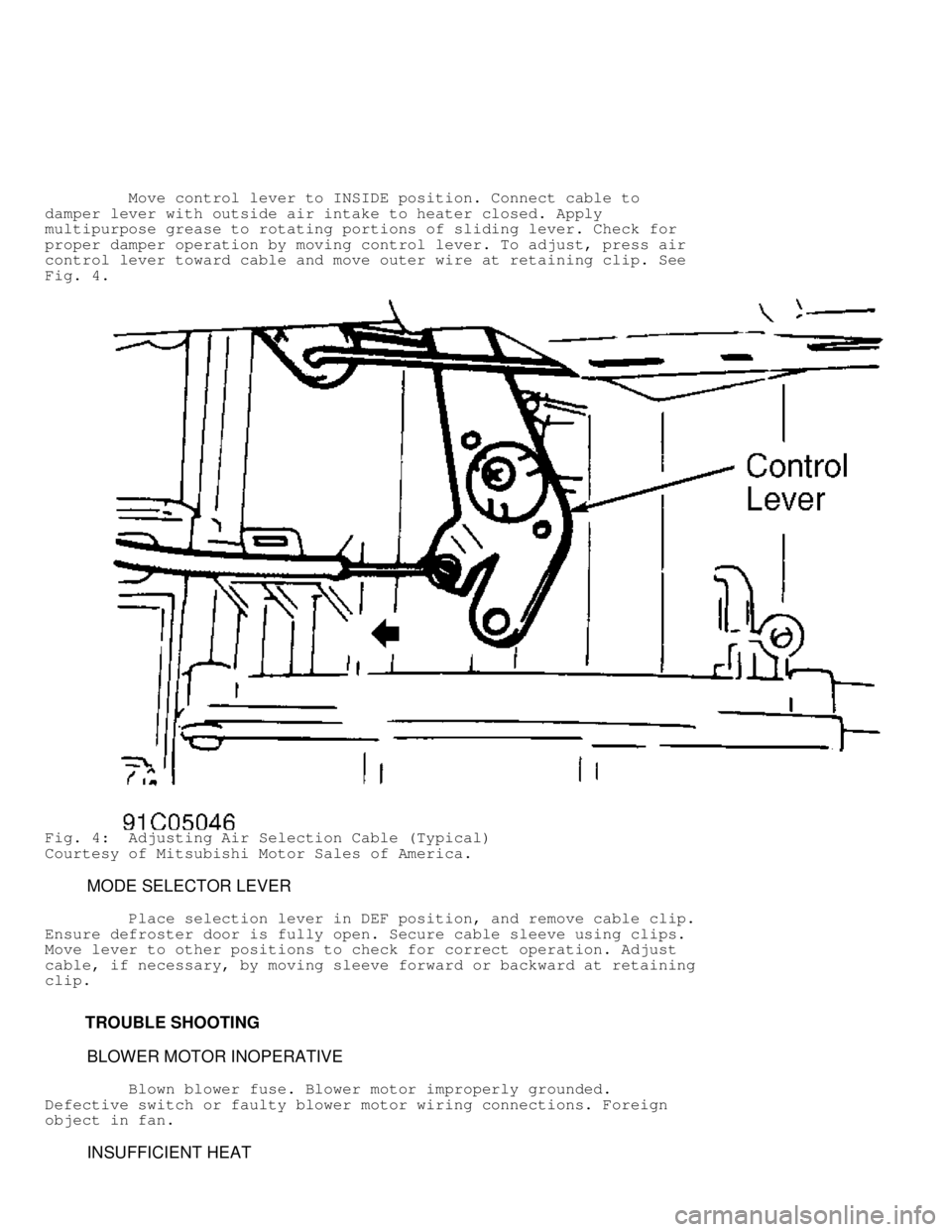
Move control lever to INSIDE position. Connect cable to
damper lever with outside air intake to heater closed. Apply
multipurpose grease to rotating portions of sliding lever. Check for
proper damper operation by moving control lever. To adjust, press air
control lever toward cable and move outer wire at retaining clip. See
Fig. 4.
Fig. 4: Adjusting Air Selection Cable (Typical)
Courtesy of Mitsubishi Motor Sales of America.
MODE SELECTOR LEVER
Place selection lever in DEF position, and remove cable clip.
Ensure defroster door is fully open. Secure cable sleeve using clips.
Move lever to other positions to check for correct operation. Adjust
cable, if necessary, by moving sleeve forward or backward at retaining
clip.
TROUBLE SHOOTING
BLOWER MOTOR INOPERATIVE
Blown blower fuse. Blower motor improperly grounded.
Defective switch or faulty blower motor wiring connections. Foreign
object in fan.
INSUFFICIENT HEAT
Page 608 of 1333
Fig. 6: Blower Motor Switch Connector Terminal ID (Montero)
Courtesy of Mitsubishi Motor Sales of America.
BLOWER MOTOR TEST
1) Turn ignition on. Check fuses. If fuses are bad, check
wiring harness for short circuits. If fuses are okay, check voltage
between heater relay and ground circuit. If voltage does not exist at
heater relay, check for broken wire between fuse block and heater
relay.
2) If voltage exists at heater relay, check relay, and
replace if necessary. See BLOWER MOTOR RELAY TEST under TESTING. If
relay is okay, disconnect blower motor connector. Set heater switch to
either LO, MED or HI setting.
3) Check voltage between harness side of connector and
vehicle ground. Battery voltage should be present. If battery voltage
is present, go to next step. If battery voltage is not present, check
continuity between resistor terminals. See BLOWER MOTOR RESISTOR TEST
under TESTING. If continuity is not present, replace resistor.
Page 612 of 1333

screws. Remove dash panel.
4) Remove blower duct, center duct and defroster ducts. See
Fig. 2. Disconnect heater wiring harness from heater unit. Remove
heater center support brackets. Remove heater unit. Remove heater core
cover plate and joint hose. Remove heater core from heater unit.
Installation
1) To install, reverse removal procedure. Insert heater hoses
fully into pipes, and clamp securely to prevent leaks.
2) When filling radiator with coolant, first open heater
control valve fully and run engine to circulate coolant and discharge
air from inside heater and engine cooling system. Stop engine, and add
coolant.
3) Adjust all control cables. When installing heater hose
grommets, apply sealer. After installing heater control assembly,
ensure each lever operates smoothly.
HEATER CONTROL PANEL
Removal (Montero)
1) Remove heater control knob and heater fan switch knob.
Remove center console. Remove defroster nozzle at temperature control
cable side.
2) Remove lap heater duct and glove box stopper, and push
glove box forward and down. Disconnect inside/outside control cable
from blower assembly.
3) Disconnect control cables from heater unit. Remove heater
control panel mounting screws, and pull out panel slightly. Disconnect
heater fan switch harness connectors. Remove heater control panel.
Remove heater fan switch from heater control panel.
Installation
1) Place air outlet change-over lever at closed position.
With heater side air outlet change-over damper lever in position,
connect inner cable to lever, and secure cable casing using clips.
2) Place heater control lever at OFF position. With heater
control lever in position, connect inner cable to lever, and secure
cable casing using clips.
3) Place inside/outside air change-over lever at INSIDE
position. With heater side inside/outside air change-over damper lever
in position, connect inner cable to lever, and secure cable casing
using clips.
4) Set control lever to each position to check for correct
operation. If lever does not operate correctly, adjust by moving outer
wire at clipped point. Ensure each control lever moves smoothly. If
any noise or stiff movement exists, apply multipurpose grease to all
moving parts.
NOTE: When mounting heater control panel to instrument panel,
tighten upper bolts to instrument panel so they also secure
center panel.
Removal & Installation (Pickup & Ram-50)
Remove cluster panel. Remove all control cables at heater.
Remove heater control panel. To install, reverse removal procedure.
Adjust cables as necessary.
WIRING DIAGRAMS
Page 613 of 1333
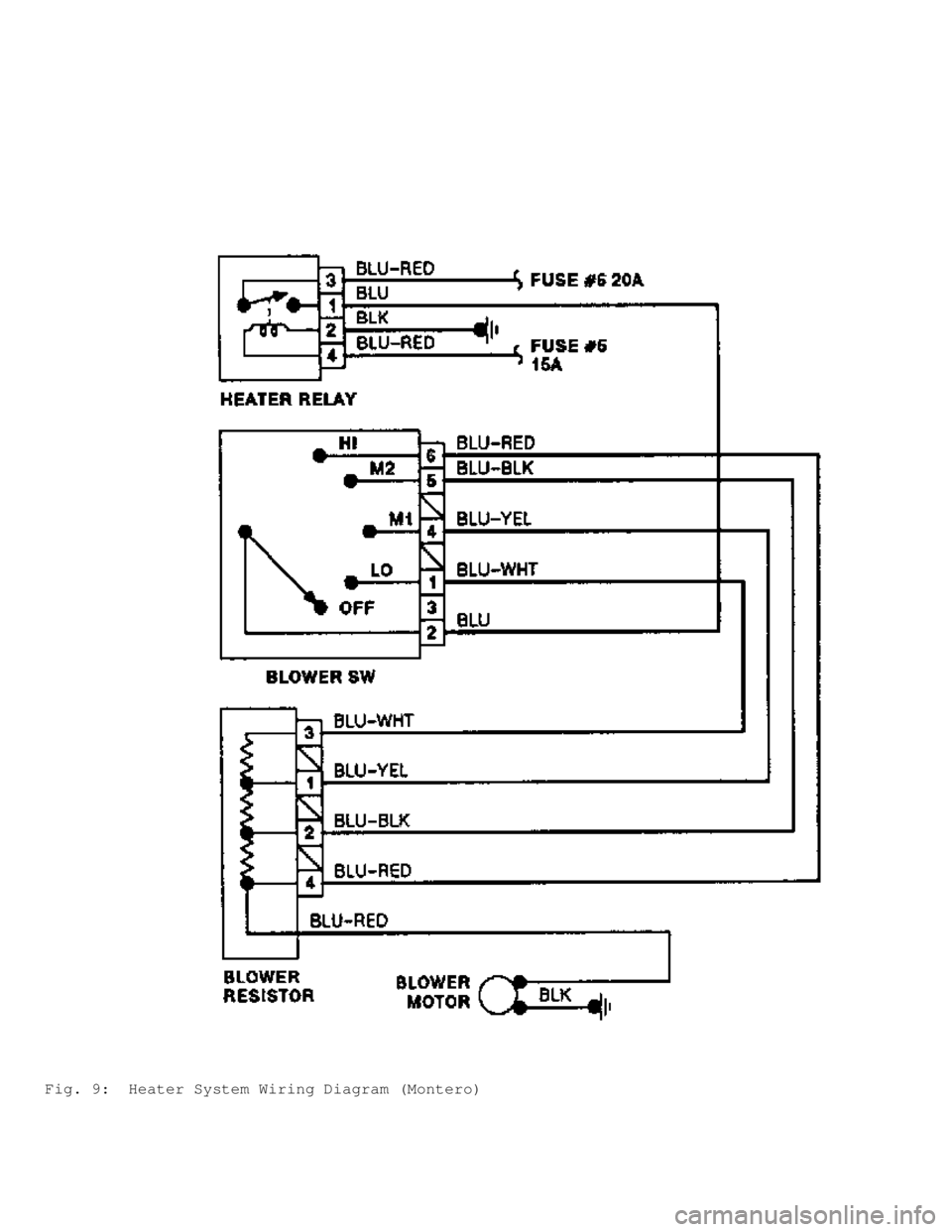
Fig. 9: Heater System Wiring Diagram (Montero)
Page 614 of 1333
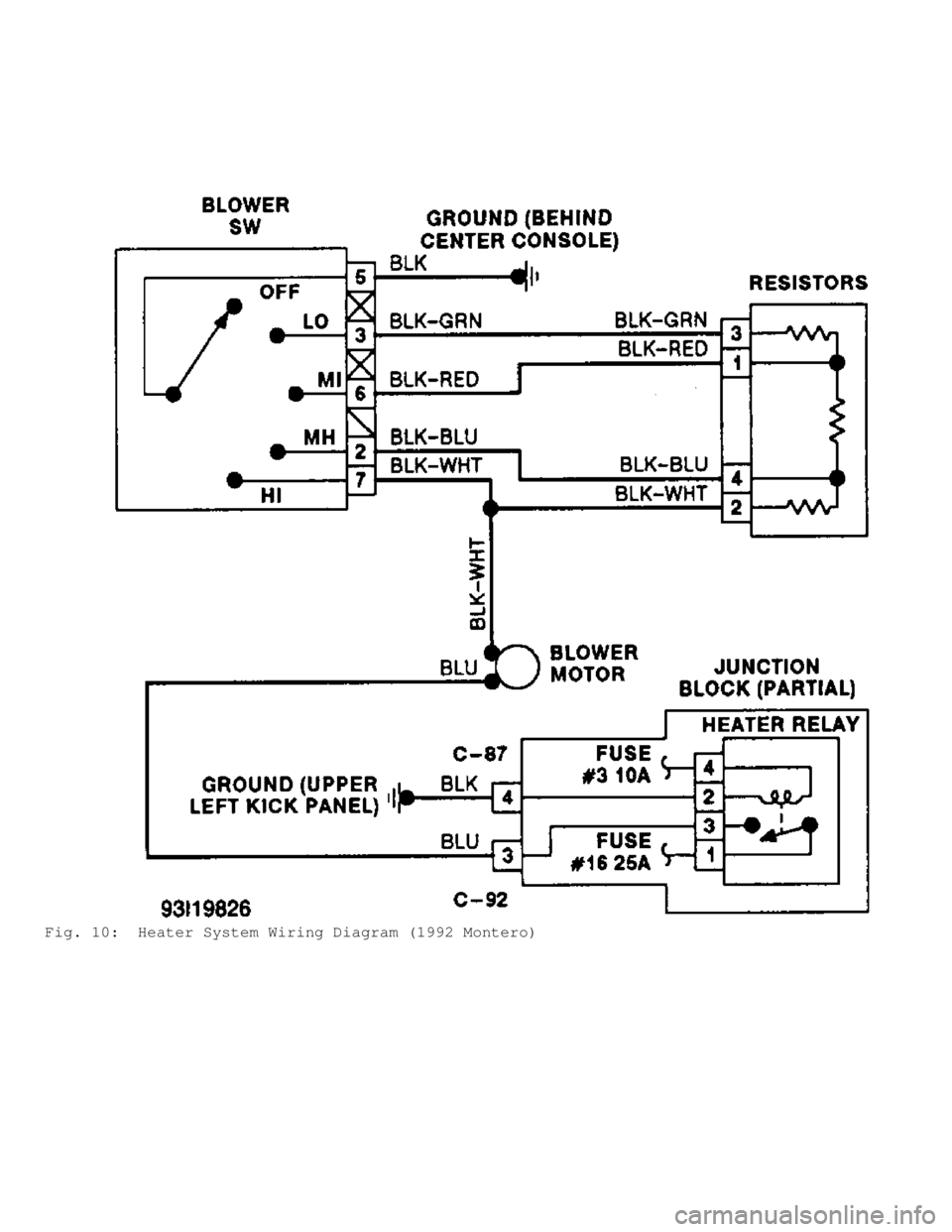
Fig. 10: Heater System Wiring Diagram (1992 Montero)
Page 615 of 1333
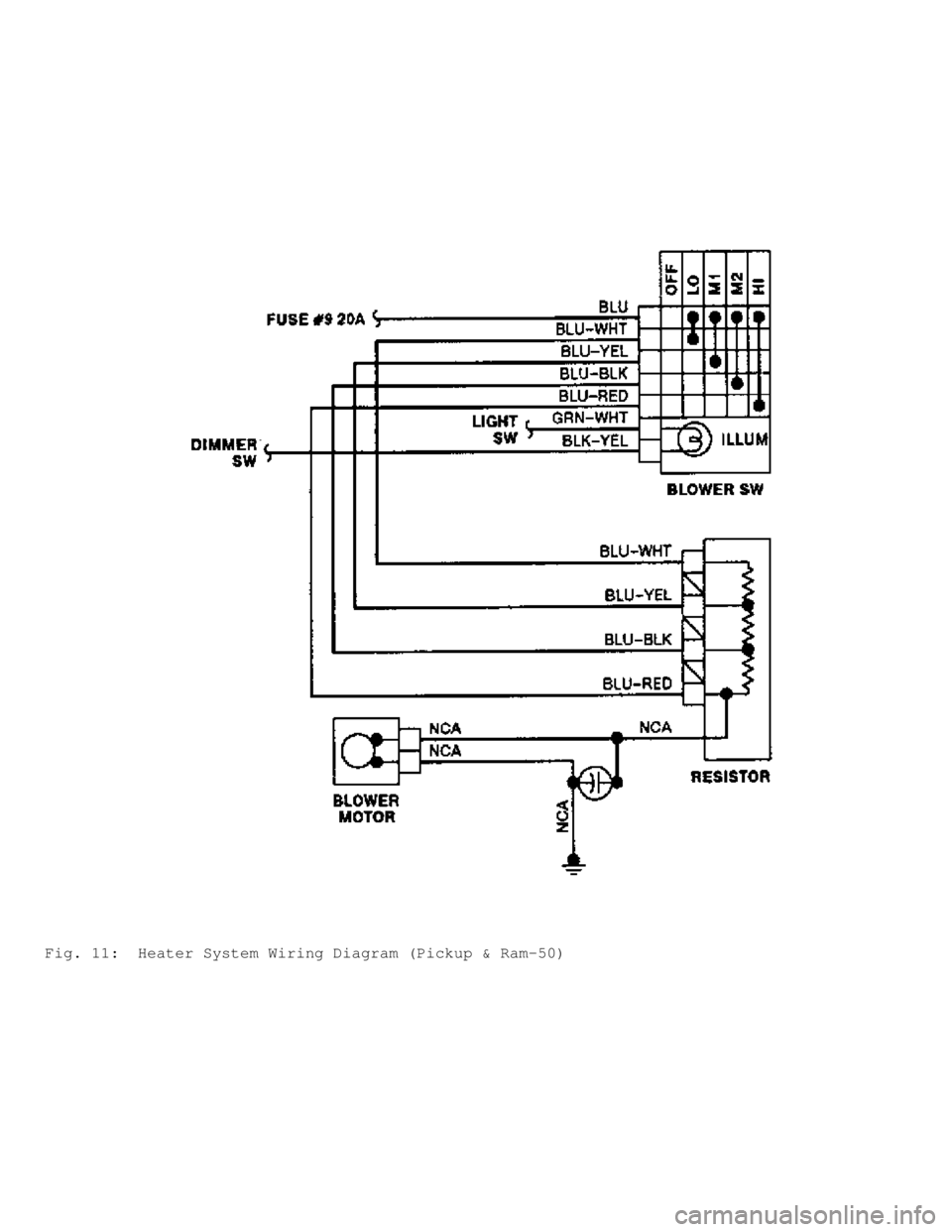
Fig. 11: Heater System Wiring Diagram (Pickup & Ram-50)
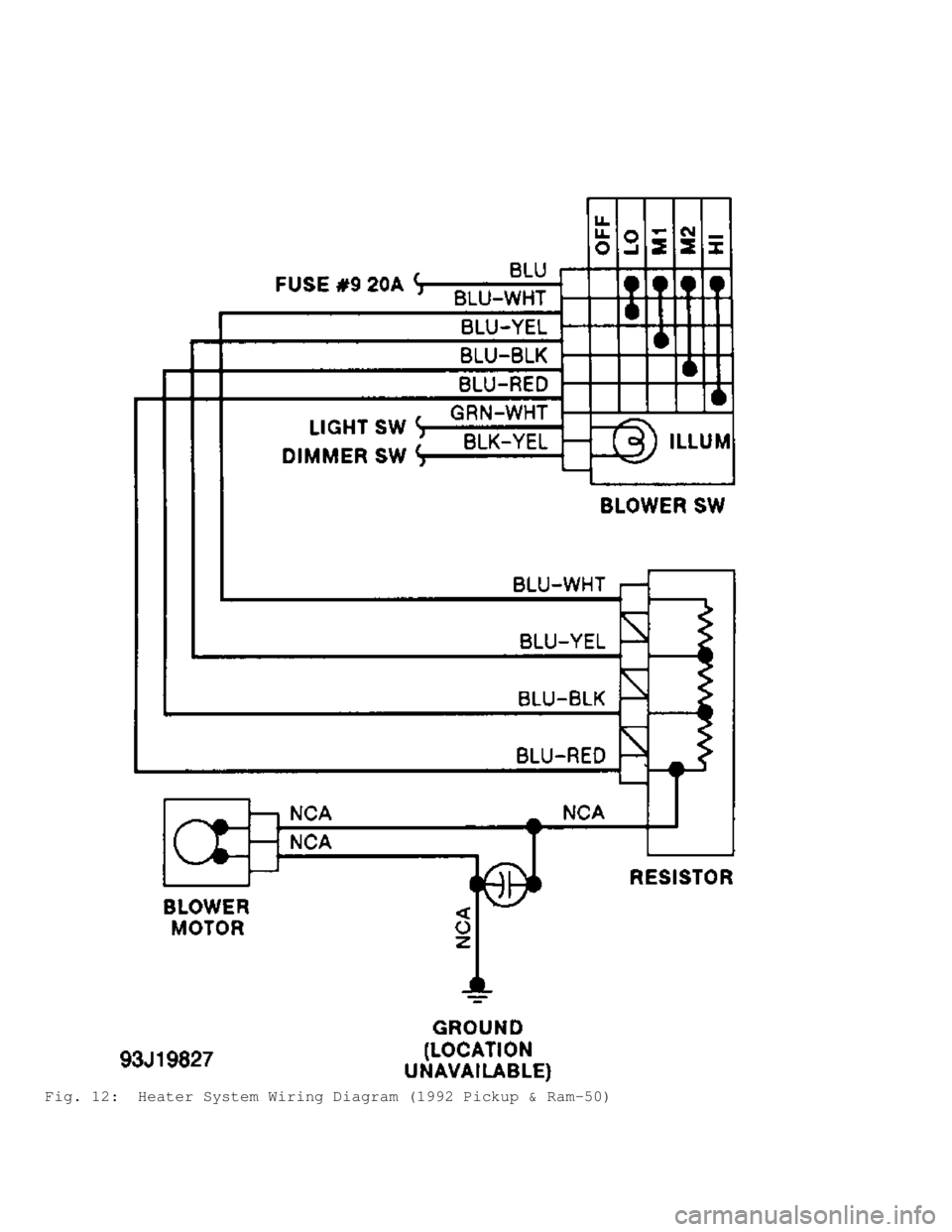
Page 616 of 1333
Fig. 12: Heater System Wiring Diagram (1992 Pickup & Ram-50)
Page 617 of 1333

HO W T O U SE S YSTE M W IR IN G D IA G RAM S
�1991 M it s u bis h i M onte ro
GENERAL INFORMATION
Using Wiring Diagrams
All Models
INTRODUCTION
This CD obtains wiring diagrams and technical service
bulletins, containing wiring diagram changes from the domestic and
import manufacturers. These are checked for accuracy and are all
redrawn into a consistent format for easy use.
In the past, when cars were simpler, diagrams were simpler.
All components were connected by wires and diagrams seldom exceeded 4
pages in length. Today, some wiring diagrams require more than 16
pages. It would be impractical to expect a service technician to trace
a wire from page 1 across every page to page 16.
Removing some of the wiring maze reduces eyestrain and time
wasted searching across several pages. Today the majority of
these
diagrams follow a much improved format, which permits space for
internal switch details.
Wiring diagrams are drawn in a "top-down" format. The
diagrams are drawn with the power source at the top of the diagram and
the ground point at the bottom of the diagram. Components locations
are identified on the wiring diagrams. Any wires that don't connect
directly to a component are identified on the diagram to indicate
where they go.
COLOR ABBREVIATIONS
COLOR ABBREVIATIONS TABLE���������\
���������\
���������\
���������\
���������\
���������\
�����
Color Normal Optional
Black ................ BLK .......................... BK
Blue ................. BLU .......................... BU
Brown ................ BRN .......................... BN
Clear ................ CLR .......................... CR
Dark Blue .......... DK BLU ...................... DK BU
Dark Green ......... DK GRN ...................... DK GN
Green ................ GRN .......................... GN
Gray ................. GRY .......................... GY
Light Blue ......... LT BLU ...................... LT BU
Light Green ........ LT GRN ...................... LT GN
Orange ............... ORG .......................... OG
Pink ................. PNK .......................... PK
Purple ............... PPL .......................... PL
Red .................. RED .......................... RD
Tan .................. TAN .......................... TN
Violet ............... VIO .......................... VI
White ................ WHT .......................... WT
Yellow ............... YEL .......................... YL
���������\
���������\
���������\
���������\
���������\
���������\
�����
IDENTIFYING WIRING DIAGRAM ABBREVIATIONS
NOTE: Abbreviations used on these diagrams are normally
self-explanatory. If necessary see ABBREVIATIONS