1987 NISSAN PULSAR heating
[x] Cancel search: heatingPage 81 of 238

Cooling and Heating Systems 81
continuous stream of bubbles indicates that the refriger-
ant charge is low.
A large number of bubbles or foam indicates that
the refrigerant charge is very low.
No bubbles or the presen ce of oil streaks in the
sight glass indicate that the system is completely
empty.
NOTE: If the outside air temperature is
high, a certain number of bubbles may be
observed in the sight gl ass, even though the
system is fully charged.
If the system requires recharging, the vehicle
should be taken to an authorized dealer for evacu-
ation, leak testing and recharging.
Do not operate the system if it is known that the
refrigerant charge is low as damage may result.
MAINTENANCE
The air conditioning system requires l i t t l e main-
tenance other than the following. Where applicable,
refer to the Lubrication an d Maintenance section for
the recommended service intervals.
(1) Check the refrigerant charge level in the
receiver/dryer sight glass. Recharge the system as
necessary. It is considered normal for the system to
require periodic recharging. (2) Inspect the air conditioner pipes and hoses
for leaks, deterioration and alignment. Evidence of oil
leakage is an indication of refrigerant leakage. Repair
or renew as necessary.
(3) Inspect the evaporator drain tube and the
condenser cooling fins for blockage. Clean as neces-
sary.
(4) Check the drive belt for deterioration and for
correct tension. Refer to the Engine Tune-up section
for the correct procedure.
(5) Operate the system at least once a week for
approximately 15 minutes to keep the compressor
seals lubricated.
Page 84 of 238

Fuel and Engine Management
(4) MAP sensor faulty or supply hose discon-
nected or blocked: Check the vacuum supply hose.
Check the operation of the MAP sensor.
EXCESSIVE FUEL CONSUMPTION
(1) Blocked air cleaner element: Check the ele-
ment and clean or renew as necessary.
(2) Incorrect fuel pressure: Check the fuel pump
and fuel pressure regulator. (3) Faulty coolant temperature sensor: Check
the connections and operation.
(4) Leaks in the fuel supply system: Check the
connections and components for leakage. (5) Leaking fuel injector(s): Clean or renew the
faulty injector(s). (6) Engine operating temperature too low:
Check the thermostat and electric cooling fan as
described in the Cooling an d Heating Systems section.
2. DESCRIPTION
The engine management system on the range of
vehicles covered by this manual controls the opera-
tion of the ignition system and the fuel system.
The central component of the engine management
system is the electronic control unit (ECU). The con-
trol unit is a micro-computer which controls the igni-
tion timing and the amount of fuel injected according
to signals received from various sensors. As changes
are detected in engine load and speed, coolant tem-
perature, barometric pressure, air temperature (1.8
liter engine), throttle position and vehicle speed, the
control unit alters the ignition timing and the fuel
injection amount to achieve optimum engine effi-
ciency.
The control unit incorporates a self diagnosis
mode which stores and displays codes relating to
certain system malfunctions. Whenever power is sup-
plied to the control unit, the control unit performs a
View of the 1.8 liter engine showing the engine management components.
Ensure that all fuel connections are securely tightened.
Page 110 of 238

110 Fuel and Engine Management
originally performed, an intermittent fault is indi-
cated. Proceed as follows:
(a) Check for faulty wiri ng connections. Check
that all wiring connectors are clean and secure. (b) Check that all earth wires are secure.
(4) Disconnect the wiring connector from the
coolant temperature sensor. (5) With the ignition switched On, measure the
voltage across the terminals on the coolant tempera-
ture sensor wiring connector. The voltage should be
4-6 volts.
If the voltage is below 4 volts, proceed to opera-
tion (9).
If the voltage is as specified, proceed as follows.
(6) Remove the coolant temperature sensor
from the vehicle. (7) Connect an ohmmeter to the coolant temper-
ature sensor terminals. (8) Immerse the meta1 end of the coolant
tem-
perature sensor in a 50/50 mixture of glycol and iced
water at a temperature of 0 deg C. The resistance
should be 6 000 ohms. Slowly heat the mixture and measure the resis-
tance of the coolant temperature sensor at the follow-
ing temperatures. Compare the results with the spec-
ified values:
0 d e g C ................................................. 6 000 ohms
20 deg C .................................................. 2 500 ohms
30 deg C .................................................. 1 800 ohms
40 deg C.................................................. 1 200 ohms
70 deg C .......................................................450 ohms
90 degC .......................................................250 ohms
100 deg C.....................................................190 ohms
110 deg C.....................................................110 ohms
If the resistances obtained are not as specified at
any of the given temperatures, renew the coolant
temperature sensor and retest for fault codes.
(9) Disconnect the control unit wiring connec-
tors.
(10) Check the wiring harness for shorts and
continuity between the coolant temperature sensor
wiring connector terminals and the control unit wiring
connector terminals C10 and D2. Repair or renew the
wiring harness as necessary.
Also check the control unit terminals for damage.
If no fault is found, renew the control unit and
retest for fault codes.
To Remove and Install
(1) Disconnect the negative battery terminal.
(2) Disconnect the wiring connector from the
coolant temperature sensor.
(3) Drain the coolant as described in the Cooling
and Heating Systems section to a level below the
sensor.
(4) Unscrew the sensor from the thermostat
housing. Installation is a reversal of the removal procedure
with attention to the following points;
(1) Apply Loctite 675 or a similar conductive
sealer to the threads of th e sensor. Tighten the sensor
to the specified torque.
(2) Fill the cooling system with the correct
mixture of water and inhibitor as described in the
Cooling and Heating Systems section. (3) Ensure that the wiring connector is clean and
secure.
THROTTLE POSITION SENSOR
To Test - Codes 21 and 22
NOTE: The following test procedure as-
sumes that fault codes 21 or 22 have been
displayed during the se lf diagnosis test pro-
cedure. If no codes have been displayed but
the operation of the throttle position sensor
is suspect, begin the test procedure at oper-
ation (24).
(1) Erase the self diagnosis code memory as
previously described.
(2) Start and run the engine at idle speed for 60
seconds or until the ECM warning lamp lights. If the engine will not start, disconnect the throttle
position sensor wiring co nnector and proceed to
operation (8). .
(3) With the engine id ling, quickly increase the
engine speed to 3 000 rpm and return to idle.
If the ECM warning lamp remains illuminated,
proceed to operation (4).
If the ECM warning lamp extinguishes, an inter-
mittent fault is indicated. Proceed as follows:
(a) Check for faulty wiri ng connections. Check
that all wiring connectors are clean and secure. (b) Check that all earth wires are secure.
(4) Stop the engine, switch the ignition On and
connect a jumper lead between terminals A and B on
the diagnostic link connect or. Note any fault codes
displayed.
If codes 21 or 22 are displayed, proceed as
follows.
(5) Remove the jumper lead from the diagnostic
link connector. (6) Erase the self diagnosis codes as previously
described. (7) Disconnect the wiring connector from the
throttle position sensor. If code 22 was displayed in operation (4), proceed
to operation (13).
If code 21 was displayed in operation (4), proceed
as follows.
(8) Start and run the engine at idle speed for 2
minutes or until the ECM warning lamp lights. If the
engine will not start, pr oceed to operation (11).
(9) Stop the engine, switch the ignition On and
connect a jumper lead between terminals A and B on
Page 181 of 238
Brakes 181
chor plate to the steering knuckle and slide the caliper
off the brake disc. Suspend the caliper clear of the
work area using wire or cord.
(3) Suitably mark the location of the disc in
relation to the hub.
(4) Slide the disc off the hub. If the disc is
difficult to remove, install two M8 x 1.25 mm bolts in
the disc and by alternatively tightening the bolts,
remove the disc.
Do not use a hammer to remove the disc.
Installation is a reversal of the removal procedure
ensuring that the mating face s of the disc and hub are
clean and free from burrs and that the marks made on
removal are aligned.
To Inspect
(1) Inspect the machined faces of the disc for
scores, cracks, wear and signs of overheating. (2) Using a micrometer, measure the thickness
of the disc at several positi ons around the face of the
disc. Renew the disc if the minimum thickness is
below Specifications.
Inspect the brake discs for scoring and wear.
(3) If the disc thickness is satisfactory but the
disc is scored, machine equal amounts from the
machined face on each side of the disc, to restore the
serviceability of the disc.
NOTE: Disc machining is best entrusted to
a reliable brake specialist who can advise on
disc serviceability.
6. REAR DISC BRAKES
Special Equipment Required:
To Check Disc Runout — Dial gauge
To Check Disc Thickness — Micrometer
TO CHECK AND RENEW BRAKE PADS
( 1 ) Raise the rear of the vehicle and place it on
chassis stands. Remove the rear wheels.
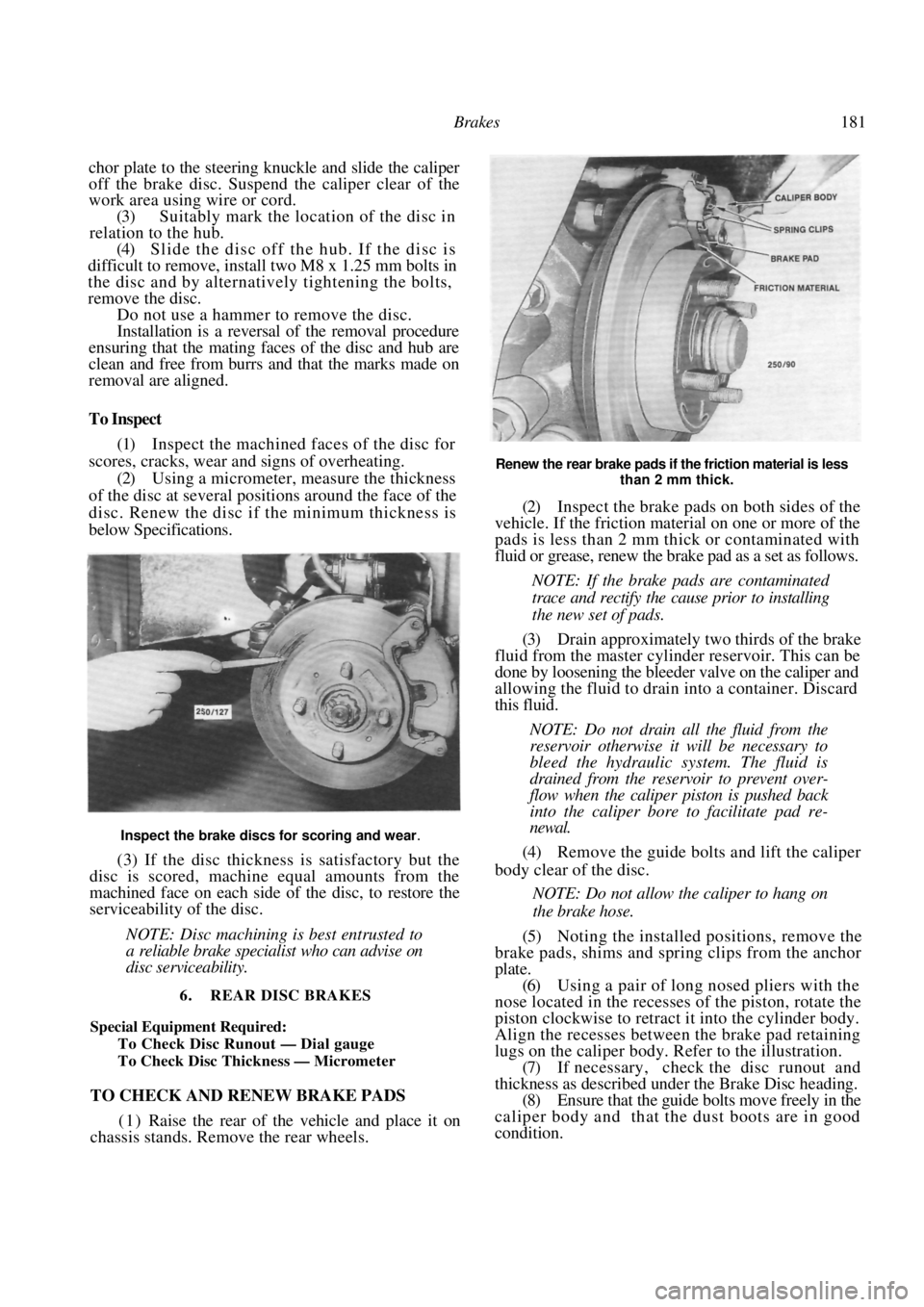
Renew the rear brake pads if the friction material is less
than 2 mm thick.
(2) Inspect the brake pads on both sides of the
vehicle. If the friction material on one or more of the
pads is less than 2 mm thick or contaminated with
fluid or grease, renew the brake pad as a set as follows.
NOTE: If the brake pads are contaminated
trace and rectify the cause prior to installing
the new set of pads.
(3) Drain approximately two thirds of the brake
fluid from the master cylinder reservoir. This can be
done by loosening the bleeder valve on the caliper and
allowing the fluid to drai n into a container. Discard
this fluid.
NOTE: Do not drain all the fluid from the
reservoir otherwise it will be necessary to
bleed the hydraulic system. The fluid is
drained from the reservoir to prevent over-
flow when the caliper piston is pushed back
into the caliper bore to facilitate pad re-
newal.
(4) Remove the guide bolts and lift the caliper
body clear of the disc.
NOTE: Do not allow the caliper to hang on
the brake hose.
(5) Noting the installed positions, remove the
brake pads, shims and spring clips from the anchor
plate.
(6) Using a pair of long nosed pliers with the
nose located in the recesses of the piston, rotate the
piston clockwise to retract it into the cylinder body.
Align the recesses between the brake pad retaining
lugs on the caliper body. Refer to the illustration. (7) If necessary, check the disc runout and
thickness as described under the Brake Disc heading.
(8) Ensure that the guide bolts move freely in the
caliper body and that the dust boots are in good
condition.
Page 184 of 238

184 Brakes
than 0.05 mm. If the wheel hub end float exceeds
Specifications, the bearing must be renewed as de-
scribed in the Rear Suspension section.
(3) Position the dial gauge plunger against the
centre of the brake disc contact area. Rotate the hub
and measure the runout. Ma ximum allowable runout
is 0.07 mm. (4) If the runout exceeds the specified amount,
machine or renew the brake disc. (5) Install the rear wheel and lower the vehicle to
the ground. (6) Road test the vehicle and check for correct
brake operation.
To Remove and Install
(1) Raise the rear of the vehicle and support it
on chassis stands. Remove the relevant rear wheel.
(2) Remove the clip securing the brake hose to
the suspension unit and disengage the hose. (3) Remove the bolts retaining the caliper an-
chor plate. (4) Slide the caliper from the brake disc and
suspend the caliper clear of the work area using wire
or cord.
NOTE: Do not allow the caliper to hang on
the brake hose.
(5) Remove the grease cap from the rear hub.
(6) Remove the split pin, nut retainer, hub nut
and washer from the stub axle. (7) Remove the hub assembly from the stud
axle. Installation is a reversal of the removal procedure
with attention to the following points:
(1) Tighten the rear hub to the specified torque.
(2) Install the brake caliper and tighten all the
bolts to the specified torque. (3) Rotate the hub and check for roughness. If
the hub does not rotate smoothly, renew the hub
bearing as described in the Rear Suspension section. (4) Install the rear wheel and lower the vehicle to
the ground.
(5) Road test the vehicle and check for correct
brake operation.
To Inspect
(1) Inspect the machined faces of the disc for
scores, cracks, wear and signs of overheating. (2) Using a micrometer, measure the thickness
of the disc at several posit ions around the face of the
disc. Renew the disc if the minimum thickness is
below Specifications.
(3) If the disc thickness is satisfactory but the
disc is scored, machine equal amounts from the
machined face on each side of the disc, to restore the
serviceability of the disc.
Inspect the machined faces of the disc for scores,
cracks, wear and signs of overheating.
NOTE: Disc machining is best entrusted to
a reliable brake specialist who can advise on
disc serviceability.
7. REAR DRUM BRAKES
TO REMOVE AND DISMANTLE
(1) Raise the rear of the vehicle and support it
on chassis stands. Remove th e rear wheels and release
the handbrake.
(2) Remove the grease cap from the rear hub.
(3) Remove the split pin, nut retainer, hub nut
and washer from the stub axle. Remove the brake
drum and hub assembly.
(4) Mark each brake shoe and spring to ensure
correct assembly. (5) Rotate the star wheel until the adjuster
assembly is at its shortest length.
Installed view of the left hand side rear drum brake
components.
Page 197 of 238

Electrical System 197
Switch on all lamps and allow them to
illuminate for approximately five minutes to reduce
the charge of the battery and to apply a load to the
circuit.
Start the engine and gradually increase the
speed to approximately 2 500 rpm. The reading on
the ammeter should be approximately 75% of the
rated output of the altern ator. See Specifications.
Switch off all the lamps and run the engine at
1 500-2 000 rpm until the indicated charge is below
10 amps. The voltmeter should now read in excess of
13.6 volts.
NOTE: Should the alternator fail to reach
the specific output, the unit will have to be
removed and overhauled or a replacement
unit installed.
Should the voltage reading be above or
below Specifications, the regulator will have
to be renewed.
TO REMOVE AND INSTAL
Disconnect the negative battery terminal.
On 1.8 liter engines, remove the bolt secur-
ing the air cleaner intake duct and remove the air
cleaner intake duct. Drain the radiator by releasing the radiator
drain plug, located at the bottom of the radiator and
allow the coolant level to fall below the thermostat
housing level. NOTE: Refer to the Cooling and Heating
Systems section when refilling the radiator
coolant to its correct l
evel, failure to do so
could result in severe damage to engine
components.
Remove the retaining bolts securing the
thermostat housing, disconnect the hose from the
radiator and remove the thermostat housing and
radiator hose from the vehicle. Using a socket and extension bar, remove the
bolt securing the alternator to the drive belt tensioning
bar located under the alternator. On vehicles not equipped with air condition-
ing, remove the front splash guard from under the
front of the vehicle and remove the bolt securing the
alternator to the drive belt tensioning bar. Loosen the upper mounting bolts, slacken
the alternator drive belt and remove it from the
alternator pulley.
While supporting the alternator, remove the
upper mounting bolts and remove the alternator from
the vehicle. Installation is a reversal of the removal procedure
with attention to the following points:
Do not over tension the drive belt. Refer
to
the Engine Tune-up section for the correct belt
adjusting procedure. Ensure that the wiring and connectors are
securely located on the alternator.
Dismantled view of the Bosch alternator.
Page 198 of 238

198 Electrical System
(3) Replenish the coolant in the radiator. Refer
to the Cooling and Heating Systems section for the
correct procedure.
TO DISMANTLE
Bosch Alternator
Remove the alternator from the vehicle as
previously described.
Scribe a mark across the drive end bracket,
stator and slip ring end bracket to facilitate correct
alignment during assembly. Remove the screws and washers securing the
regulator and brush holder assembly. Withdraw the
regulator and brush holder assembly from the alter-
nator. Remove the long screws securing the drive
end bracket to the slip ring end bracket and withdraw
the drive end bracket, rotor and pulley assembly.
NOTE: Ensure that the wave washer behind
the rotor shaft rear bearing in the slip ring
end bracket is not mislaid.
Holding the rotor in a soft jawed vice,
remove the split drive pulley retaining nut, washer
and spacer from the rotor shaft. Remove the split driv e pulley, spacer, plate
washer and fan from the rotor shaft. Using a suitable pres s and press plates,
support the drive end bracket with the pulley end of
the rotor shaft uppermost a nd carefully press the rotor
shaft from the spacer, bearing and the drive end
bracket.
Remove the spacer and the bearing retainer
plate screws from the drive end bracket. Remove the bearing retainer plate and the
bearing from the drive end bracket. If necessary, using a bearing puller, remove
the rear bearing from the rotor shaft. Remove the nut, spring washer and output
terminal components from the {B + ) terminal on the
outside of the slip ring end bracket.
(12) Working inside the slip ring end bracket,
remove the screws securing the diode pack to the
bracket and withdraw the stator and diode pack as an
assembly. Remove the insulating spacer and washer
from the (B +) terminal.
NOTE: The diode pack is supplied as an
assembly and in the event of a component
'failure, must be renewed as a complete unit.
Mark all wiring connections prior to removal
to aid assembly. Where necessary, unsolder the stator leads
from the connector terminals to separate the diode
pack.
NOTE: When soldering or unsoldering the
stator leads from the diodes, grip the leads
with a pair of long nosed pliers. This will
safeguard the diodes by transferring any
excess heat to the jaws of the pliers.
Hitachi Alternator
Remove the alternator from the vehicle as
previously described.
Scribe a mark across the drive end bracket,
stator and slip ring end bracket to facilitate correct
alignment during assembly. Remove the through bolts retaining the drive
end bracket to the slip ring end bracket. Apply a heated 200 watt soldering iron to the
slip ring end bracket at the bearing mounting boss for
3-4 minutes to heat the bracket and allow the removal
of the slip ring end bearing. Carefully prise the slip ring end bracket and
stator assembly from the drive end bracket and rotor
assembly using suitable levers. Do not insert the levers
too far or damage to the stator will occur.
Hold the rotor and driv e end bracket assem-
bly in a soft jawed vice and remove the nut retaining
the drive pulley to the rotor. Remove the washer, pulley and spacer
washer from the rotor shaft.
Using a soft faced hammer, drive the rotor
shaft assembly from the drive end bracket and remove
the inner spacer washer from the rotor shaft.
Remove the bearing retainer plate screws
and remove the plate. Using a suitable drift, drive the
bearing from the bracket. Remove the retaining nut and insulator
washer from the alternator terminal. Remove the slip ring end bracket retaining
nuts and separate the diode pack, stator and regulator
assembly.
If necessary, file the ends of the brush
assembly retaining rivets, caref ully unsolder the ter-
minal plate and remove the brush assembly and
terminal plate from the diode pack. If necessary, remove the fan guide retaining
View of the Bosch alternator stator assembly and the
slip ring end bracket.
Page 200 of 238

200 Electrical System
Using an ohmmeter to test for bridging or internal shorting of the rotor fields.
internally, while a high reading indicates an open
circuit or high resistance in the windings. In both
cases a new rotor assembly will have to be installed.
Stator Windings
The stator test is carried out using a test lamp.
The stator leads must be detached from the
diode pack.
Connect a jumper lead from the negative
terminal of a charged 12 volt battery to the stator
winding frame. Connect one en d of a test lamp to the
battery positive terminal, the other end of the test
lamp to the stator lead, one at a time. Should the test lamp illuminate, however
dimly, a short circuit is indicated and the stator
assembly must be renewed.
Diodes
On some models the diod es may be tested after
disconnection. Testing can be done by using a 12 volt
battery and a 1.5 watt bulb in series with a jumper
lead.
Connect a jumper lead from the negative
terminal of a charged battery to the carrier/bracket
holding the diode to be tested. Connect one end of a test lamp to the battery
positive terminal and the other end of the lamp to the
diode lead. Note whether the lamp is illuminated and
then reverse the connections on the battery. If the lamp was illuminated in both direc-
tions or was not illuminated at all, the diode is faulty
and the diode pack/heat sink must be renewed.
Brush Springs and Brushes
Check the brush spring s for overheating and
distortion, check for binding in the brush holder.
Check the brush length and renew as neces-
sary. Refer to Specifications for the correct dimen-
sions. TO ASSEMBLE
Bosch Alternator
Assembly is a reversal of the dismantling proce-
dure with attention to the following points:
Using a hot soldering iron and a pair of long
nosed pliers as a heat sink, solder the stator leads to
their respective terminals on the diode pack. Install the insulating washer and spacer to the
(B +) terminal post and position the diode pack and
stator assembly onto the slip ring end bracket. Install
the diode pack retaining screws and tighten securely. Working on the exterior of the slip ring end
bracket, install the output terminal components to
the
(B + ) terminal and secure the retaining nut.
Position the bearing retainer, bearing and
spacer on the rotor shaft. Using a suitable press and press plates,
support the rotor sh aft on the front face of the spacer
and carefully press the rotor shaft fully into the
bearing and spacer. Position the rotor shaft assembly into the
rear of the drive end bracket and install and tighten the
bearing retainer plate screws. Install the fan, plate, spacer and split
drive
pulley to the rotor shaft and secure them with the
retaining washer and nut. If necessary, using a suitable press and press
plates, support the rotor shaft rear bearing and
carefully press the rotor shaft fully into the bearing.
NOTE: Ensure that pressure is applied only
to the inner race of the bearing.
Ensure that the rotor shaft bearing wave
washer is located in the slip ring end bracket and
insert the rotor in the stator and slip ring end bracket
assembly. Align the marks made on dismantling and
install and tighten the long securing screws.
Position the regulator and brush holder as-
sembly to the slip ring end bracket and install
and
tighten the retaining screws. Install the alternator to the vehicle and
test
the operation as prev iously described.
Hitachi Alternator
If necessary, position the new brush termi-
nals in the brush assembly and install the
brush
assembly and terminal plate to the diode pack.
Carefully solder the terminal plate to the diode pack
and secure the brush assembly by installing and
staking new rivets.
If necessary, solder the diode pack and
regulator to the stator and install the fan guide
and
retaining nuts. Tighten the retaining nuts securely.
NOTE: When soldering or unsoldering the
stator leads or bridges from the diodes or
regulator, grip the leads with a pair of long