1969 FORD MUSTANG ECU
[x] Cancel search: ECUPage 38 of 413

02-02-19
Brake System
02-02-19
that the tabs on the shoe flanges seat
fully against the caliper bridges (Fig.
25).
2.
Install the caliper splash shield
and secure the shield to the caliper
with two retaining bolts (Fig. 4).
3.
Pump the brake pedal several
times until a firm pedal is obtained
and the shoe and lining assemblies are
properly seated.
4.
Install the wheel and tire assem-
bly on the hub and rotor assembly.
5.
Check and refill the master cyl-
inder reservoir with specified brake
fluid as required.
6. Road test the car.
It should not be necessary to bleed
the system after a shoe and lining re-
placement.
FRONT WHEEL HUB AND
ROTOR ASSEMBLY-
DISC BRAKES
REMOVAL
1.
Remove the wheel and tire from
the hub (Figs. 23 and 24). Be careful
to avoid damage or interference with
the bleeder screw fitting. On Lincoln
Continental models be careful to avoid
damage to the caliper splash shield or
transfer tube.
2.
Remove the caliper assembly
from the spindle and the rotor. If the
caliper does not require servicing, it is
not necessary to disconnect the brake
hose or remove the caliper from the
vehicle. Position the caliper out of the
way, and support it with a wire to
avoid damaging the caliper or stretch-
ing the hose. Insert a clean cardboard
spacer between the linings to prevent
the piston from coming out of the cyl-
inder bore while the caliper is re-
moved.
Handle the rotor and caliper assem-
blies in such a way as to avoid defor-
mation of the rotor and nicking,
scratching or contamination of the
brake linings.
3.
Remove the grease cap from the
hub.
Remove the cotter pin, nut lock,
adjusting nut, and flat washer from
the spindle. Remove the outer bearing
cone and roller assembly.
4.
Remove the hub and rotor as-
sembly from the spindle.
INSTALLATION
1.
If the rotor is being replaced, re-
move the protective coating from the
new rotor with carburetor degreaser.
Pack a new set of bearings with speci-
fied grease (M-1C75B), and install the
inner bearing cone and roller assembly
in the inner cup. Pack grease lightly
between the lips of a new grease seal
and install the seal (Figs. 23 and 24).
If the original rotor is being in-
stalled, make sure that the grease in
the hub is clean and adequate, that
the inner bearing and grease seal are
lubricated and in good condition, and
that the rotor braking surfaces are
clean.
2.
Install the hub and rotor assem-
bly on the spindle.
3.
Lubricate and install the outer
wheel bearing, washer and adjusting
nut.
4.
Adjust the wheel bearings to
specification, and then install the nut
lock, cotter pin, and grease cap. The
wheel bearing adjustment is especially
important with disc brakes.
5. Mount the caliper assembly on
the spindle following the Disc Brake
Caliper Assembly Installation proce-
dure in this section.
DISC BRAKE ROTOR
SPLASH SHIELD
REMOVAL
1.
Remove the caliper and the hub
and rotor assembly as outlined under
Removal in the foregoing procedure
(it is not necessary to disconnect hy-
draulic connections).
2.
Remove the three bolts that at-
tach the splash shield to the spindle,
and remove the shield (Figs. 23 and
24).
3.
Remove and discard the splash
shield to spindle gasket.
INSTALLATION
1.
Install a new splash shield to
spindle gasket.
2.
If the shield is bent, straighten it
out before installation. Position the
shield to the mounting bracket, install
the attaching bolts, nuts and torque
them to specification.
3.
Install the hub and rotor assem-
bly and the caliper as outlined under
Installation in the foregoing proce-
dure.
DUAL MASTER CYLINDER—
NON POWER BRAKES
FORD, MERCURY
AND METEOR
Removal
Refer to Fig. 26.
BUSHING
HAIRPIN
RETAINER
BUSHING
STOPLIGHT SWITCH
13480
HI 637-A
FIG. 26—Dual Master Cylinder Installation— Non Power Brakes
Ford,
Mercury, and Meteorprocarmanuals.com
Page 39 of 413

02-02-20
Brake System
02-02-20
1.
Disconnect the stoplight switch
wires at the connector. Remove the
spring retainer. Slide the stop light
switch off the brake pedal pin just far
enough to clear the end of the pin,
then liftfthe switch straight upward
from the pin. Use care to avoid switch
damage during removal.
2.
Slide the master cylinder push
rod and the nylon washers and bush-
ings off the brake pedal pin.
3.
Remove the brake tube from the
primary and secondary outlet ports of
the master cylinder.
4.
Remove the cap screws and lock-
washers that secure the master cylin-
der to the dirSh panel and lift the cyl-
inder forward and upward from the
vehicle.
Installation
1.
Position the boot on the push
rod and secure the boot to the master
cylinder. Carefully insert the master
cylinder push rod and boot through
the dash panel opening and position
the master cylinder on the panel.
2.
Install the cap screws at the dash
panel and torque them to specifica-
tion.
3.
Coat the nylon bushings with
SAE 10W oil. Install the nylon wash-
er and bushing on the brake pedal pin.
4.
Position the stop light switch on
the brake pedal pin, install the nylon
bushing and washer and secure them
in position with the spring retainer.
5.
Connect the wires at the stop
light switch connector.
6. Connect the brake lines to the
master cylinder leaving the brake line
fittings loose.
7.
Fill the master cylinder with the
specified brake fluid to within 1/4
inch of the top of the dual reservoirs.
Use Ford Brake Fluid— Extra Heavy
Duty-Part Number C6AZ-19542-A
(ESA-M6C25-A) or equivalent for all
drum brake applications. The extra
heavy duty brake system fluid is col-
ored blue for identification. Do not
mix low temperature brake fluids with
the specified fluid for the power disc
brake system.
8. Bleed the dual-master cylinder
and the primary and secondary brake
systems. Centralize the pressure dif-
ferential valve. Refer to Hydraulic
System Bleeding and Centralizing of
the Differential Valve, Part 2-1, Sec-
tion 2 for proper procedure.
9. Operate the brakes several times,
then check for external hydraulic
leaks.
FAIRLANE, MONTEGO,
FALCON, MUSTANG AND
COUGAR
Removal
Refer to Figs. 27 and 28.
1.
Working from inside the vehicle
below the instrument panel, disconnect
the master cylinder push rod from the
brake pedal assembly. The push rod
cannot be removed from the master
cylinder.
2.
Disconnect the stoplight switch
wires at the connector. Remove the
hairpin retainer. Slide the stop light
switch off the brake pedal pin just far
enough to clear the end of the pin,
then lift the switch straight upward
from the pin. Use care to avoid switch
damage during removal.
3.
Slide the master cylinder push
rod and the nylon washers and bush-
ings off the brake pedal pin.
4.
Remove the brake tubes from
the primary and secondary outlet
ports of the master cylinder.
5.
Remove the lock nuts or cap
screw and lockwashers that secure the
master cylinder to the dash panel and
lift the cylinder forward and upward
from the car.
Installation
Refer to Figs. 27 and 28.
1.
Position the boot on tie push
rod and secure the boot to the master
cylinder. Carefully insert the master
cylinder push rod and boot through
the dash panel opening.
2.
On Fairlane, Falcon or Montego
models, position the gasket and mas-
ter cylinder on the mounting studs on
the dash panel. Install the lock nuts
on the studs at the dash panel and
torque them to specification.
3.
On Mustang or Cougar models,
position the gasket and master cylin-
der on the dash panel. Install the re-
taining screws and torque them to
specification. Coat the nylon bushings
with SAE 10W oil. Install the nylon
washer and bushing on the brake
pedal pin.
4.
Position the stop light switch on
the brake pedal pin, install the nylon
bushing and washer and secure them
in position with the spring retainer.
5.
Connect the wires at the stop
light switch connector.
6. Connect the brake lines to the
master cylinder and tighten to speci-
fied torque.
7.
Fill the master cylinder with the
specified brake fluid to within 1/4
MASTER CYLINDER
IDENTIFICATION
UPPER STUD
SHAFT (AUTOf/lATIC
TRANSMISSION)
CLIP
BRAKE PEDAL
BUSHING SUPPORT
TUBE-2B253
TUBE-2A040
CLUTCH
PEDA_
LOWER STUD
STOP LITE
SWITCH
/ 13480
MASTER CYLINDER
PUSH ROD
BRAKE PEDAL
H 1556-C
FIG. 27—Dual Master Cylinder Installation—Non Power Brake
Fairlane, Montego, and Falconprocarmanuals.com
Page 42 of 413
02-02-23
Brake System
02-02-23
BOOSTER ASSEMBLY- 2005
NUT-34444-S7
HOSE 2A047
MASTER CYLINDER
IDENTIFICATION
BRAKE TUBE-2263
BRAKE TUBE -2264
PRESSURE DIFFERENTIAL
VALVE ASSEMBLY-2B257
BRAKE TUBE-2B255
H 15S3-B
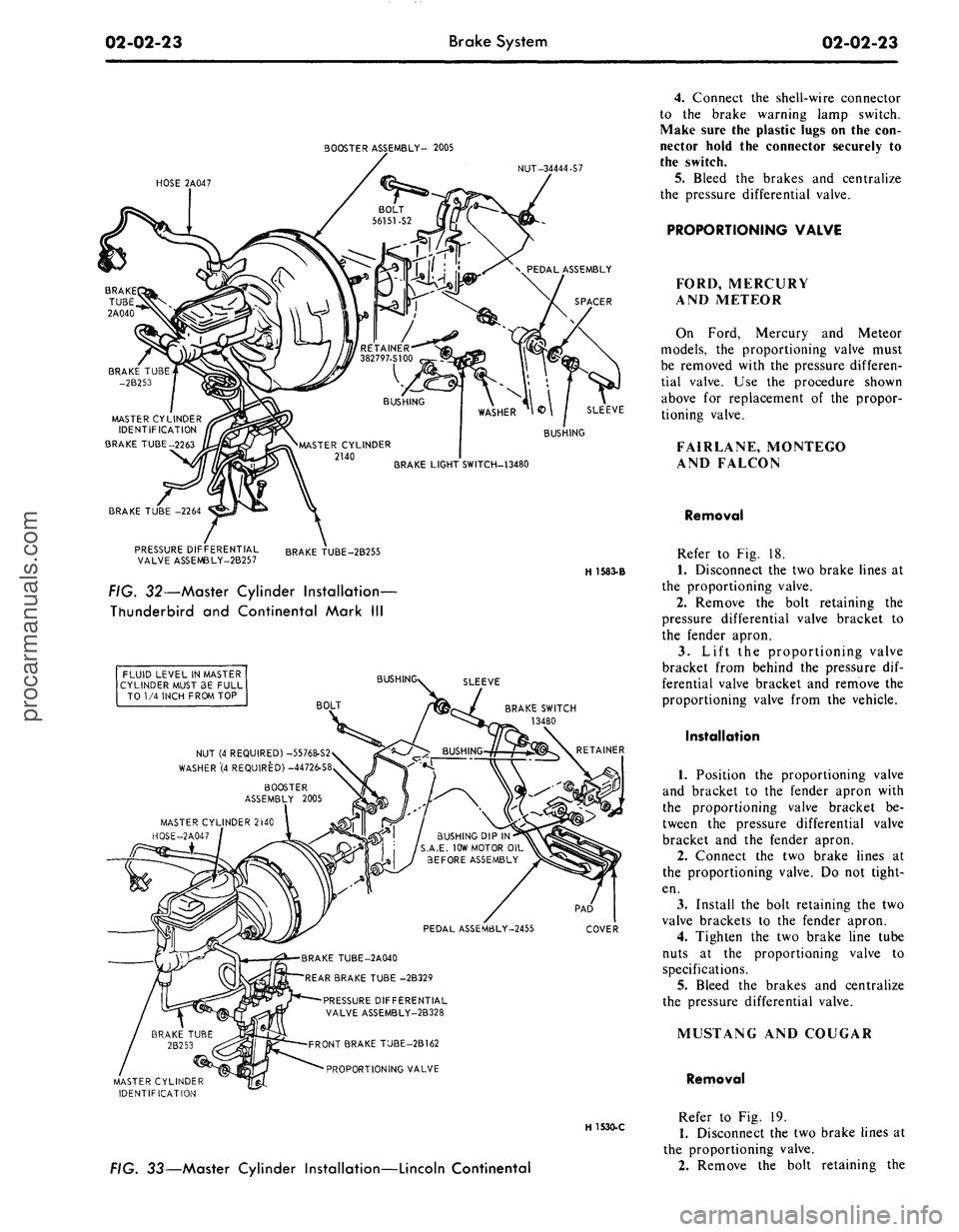
FIG. 32—Master Cylinder Installation-
Thunderbird and Continental Mark III
FLUID LEVEL IN MASTER
CYLINDER MUST 3E FULL
TO 1/4 INCH FROM TOP
BUSH
SLEEVE
BOLT
BRAKE SWITCH
13480
NUT (4 REQUIRED) -55768-S2
WASHER"(4 REQUIRED) -44726-S8
BOOSTER
ASSEMBLY 2005
MASTER CYLINDER 2WO
HOSE-2A047
BUSHING DIP IN
S.A.E. 10W MOTOR OIL
BEFORE ASSEMBLY
PEDAL ASSEM6LY-2455
COVER
BRAKE TUBE-2A040
REAR BRAKE TUBE -2B329
PRESSURE DIFFERENTIAL
VALVE ASSEMBLY-2B328
FRONT BRAKE TUBE-2B162
PROPORTIONING VALVE
MASTER CYLINDER
IDENTIFICATION
H 1530-C
FIG. 33—Master Cylinder Installation—Lincoln Continental
4.
Connect the shell-wire connector
to the brake warning lamp switch.
Make sure the plastic lugs on the con-
nector hold the connector securely to
the switch.
5. Bleed the brakes and centralize
the pressure differential valve.
PROPORTIONING VALVE
FORD, MERCURY
AND METEOR
On Ford, Mercury and Meteor
models, the proportioning valve must
be removed with the pressure differen-
tial valve. Use the procedure shown
above for replacement of the propor-
tioning valve.
FAIRLANE, MONTEGO
AND FALCON
Removal
Refer to Fig. 18.
1.
Disconnect the two brake lines at
the proportioning valve.
2.
Remove the bolt retaining the
pressure differential valve bracket to
the fender apron.
3.
Lift the proportioning valve
bracket from behind the pressure dif-
ferential valve bracket and remove the
proportioning valve from the vehicle.
Installation
1.
Position the proportioning valve
and bracket to the fender apron with
the proportioning valve bracket be-
tween the pressure differential valve
bracket and the fender apron.
2.
Connect the two brake lines at
the proportioning valve. Do not tight-
en.
3.
Install the bolt retaining the two
valve brackets to the fender apron.
4.
Tighten the two brake line tube
nuts at the proportioning valve to
specifications.
5.
Bleed the brakes and centralize
the pressure differential valve.
MUSTANG AND COUGAR
Removal
Refer to Fig. 19.
1.
Disconnect the two brake lines at
the proportioning valve.
2.
Remove the bolt retaining theprocarmanuals.com
Page 44 of 413
02-02-25
Brake System
02-02-25
clearing the pin. Slide the switch com-
pletely onto the pin, and install the
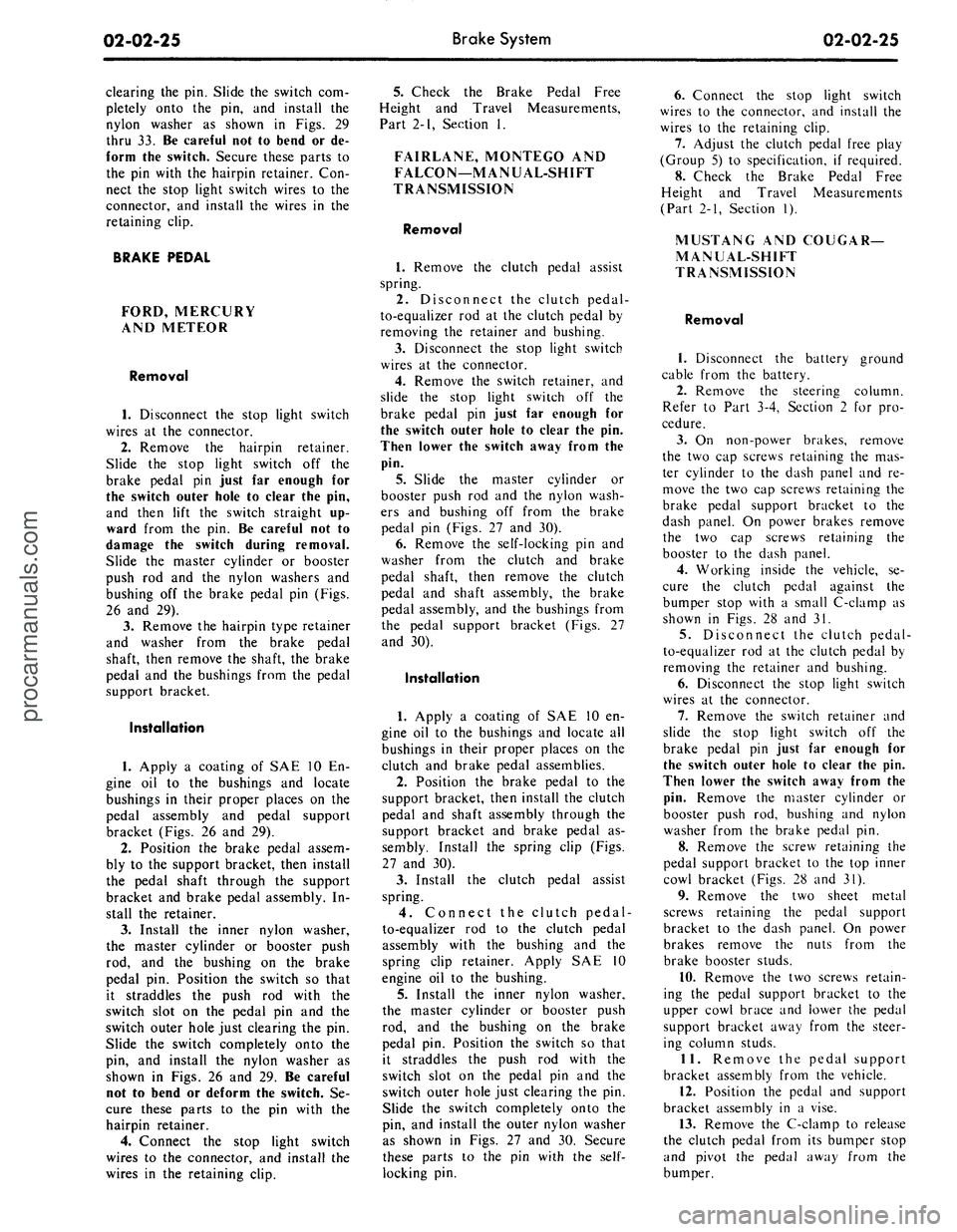
nylon washer as shown in Figs. 29
thru 33. Be careful not to bend or de-
form the switch. Secure these parts to
the pin with the hairpin retainer. Con-
nect the stop light switch wires to the
connector, and install the wires in the
retaining clip.
BRAKE PEDAL
FORD, MERCURY
AND METEOR
Removal
1.
Disconnect the stop light switch
wires at the connector.
2.
Remove the hairpin retainer.
Slide the stop light switch off the
brake pedal pin just far enough for
the switch outer hole to clear the pin,
and then lift the switch straight up-
ward from the pin. Be careful not to
damage the switch during removal.
Slide the master cylinder or booster
push rod and the nylon washers and
bushing off the brake pedal pin (Figs.
26 and 29).
3.
Remove the hairpin type retainer
and washer from the brake pedal
shaft, then remove the shaft, the brake
pedal and the bushings from the pedal
support bracket.
Installation
1.
Apply a coating of SAE 10 En-
gine oil to the bushings and locate
bushings in their proper places on the
pedal assembly and pedal support
bracket (Figs. 26 and 29).
2.
Position the brake pedal assem-
bly to the support bracket, then install
the pedal shaft through the support
bracket and brake pedal assembly. In-
stall the retainer.
3.
Install the inner nylon washer,
the master cylinder or booster push
rod, and the bushing on the brake
pedal pin. Position the switch so that
it straddles the push rod with the
switch slot on the pedal pin and the
switch outer hole just clearing the pin.
Slide the switch completely onto the
pin, and install the nylon washer as
shown in Figs. 26 and 29. Be careful
not to bend or deform the switch. Se-
cure these parts to the pin with the
hairpin retainer.
4.
Connect the stop light switch
wires to the connector, and install the
wires in the retaining clip.
5.
Check the Brake Pedal Free
Height and Travel Measurements,
Part 2-1, Section 1.
FAIRLANE, MONTEGO AND
FALCON—MANUAL-SHIFT
TRANSMISSION
Removal
1.
Remove the clutch pedal assist
spring.
2.
Disconnect the clutch pedal-
to-equalizer rod at the clutch pedal by
removing the retainer and bushing.
3.
Disconnect the stop light switch
wires at the connector.
4.
Remove the switch retainer, and
slide the stop light switch off the
brake pedal pin just far enough for
the switch outer hole to clear the pin.
Then lower the switch away from the
pin.
5. Slide the master cylinder or
booster push rod and the nylon wash-
ers and bushing off from the brake
pedal pin (Figs. 27 and 30).
6. Remove the self-locking pin and
washer from the clutch and brake
pedal shaft, then remove the clutch
pedal and shaft assembly, the brake
pedal assembly, and the bushings from
the pedal support bracket (Figs. 27
and 30).
Installation
1.
Apply a coating of SAE 10 en-
gine oil to the bushings and locate all
bushings in their proper places on the
clutch and brake pedal assemblies.
2.
Position the brake pedal to the
support bracket, then install the clutch
pedal and shaft assembly through the
support bracket and brake pedal as-
sembly. Install the spring clip (Figs.
27 and 30).
3.
Install the clutch pedal assist
spring.
4.
Connect the clutch pedal-
to-equalizer rod to the clutch pedal
assembly with the bushing and the
spring clip retainer. Apply SAE 10
engine oil to the bushing.
5.
Install the inner nylon washer,
the master cylinder or booster push
rod, and the bushing on the brake
pedal pin. Position the switch so that
it straddles the push rod with the
switch slot on the pedal pin and the
switch outer hole just clearing the pin.
Slide the switch completely onto the
pin, and install the outer nylon washer
as shown in Figs. 27 and 30. Secure
these parts to the pin with the
self-
locking pin.
6. Connect the stop light switch
wires to the connector, and install the
wires to the retaining clip.
7.
Adjust the clutch pedal free play
(Group 5) to specification, if required.
8. Check the Brake Pedal Free
Height and Travel Measurements
(Part 2-1, Section 1).
MUSTANG AND COUGAR—
MANUAL-SHIFT
TRANSMISSION
Removal
1.
Disconnect the battery ground
cable from the battery.
2.
Remove the steering column.
Refer to Part 3-4, Section 2 for pro-
cedure.
3.
On non-power brakes, remove
the two cap screws retaining the mas-
ter cylinder to the dash panel and re-
move the two cap screws retaining the
brake pedal support bracket to the
dash panel. On power brakes remove
the two cap screws retaining the
booster to the dash panel.
4.
Working inside the vehicle, se-
cure the clutch pedal against the
bumper stop with a small C-clamp as
shown in Figs. 28 and 31.
5.
Disconnect the clutch pedal-
to-equalizer rod at the clutch pedal by
removing the retainer and bushing.
6. Disconnect the stop light switch
wires at the connector.
7.
Remove the switch retainer and
slide the stop light switch off the
brake pedal pin just far enough for
the switch outer hole to clear the pin.
Then lower the switch away from the
pin.
Remove the master cylinder or
booster push rod, bushing and nylon
washer from the brake pedal pin.
8. Remove the screw retaining the
pedal support bracket to the top inner
cowl bracket (Figs. 28 and 31).
9. Remove the two sheet metal
screws retaining the pedal support
bracket to the dash panel. On power
brakes remove the nuts from the
brake booster studs.
10.
Remove the two screws retain-
ing the pedal support bracket to the
upper cowl brace and lower the pedal
support bracket away from the steer-
ing column studs.
11.
Remove the pedal support
bracket assembly from the vehicle.
12.
Position the pedal and support
bracket assembly in a vise.
13.
Remove the C-clamp to release
the clutch pedal from its bumper stop
and pivot the pedal away from the
bumper.procarmanuals.com
Page 45 of 413

02-02-26
Brake System
02-02-26
14.
Remove the clutch pedal assist
spring.
15.
On non-power brakes, remove
the retainer clip from the clutch and
brake pedal shaft, then remove the
clutch pedal and shaft assembly, the
brake pedal assembly, and the bush-
ings from the pedal support bracket.
On power brakes, remove the retainer
nut from the brake pedal shaft then
remove the pedal shaft, the brake
pedal assembly and the bushings from
the pedal support bracket.
Installation
1. Apply a coating of SAE 10 en-
gine oil to the bushings and locate all
bushings in their proper places on the
clutch and brake pedal assemblies.
2.
On non-power brakes, position
the brake pedal to the pedal support
bracket, then install the clutch pedal
and shaft assembly through the sup-
port bracket and brake pedal assem-
bly. On power brakes position the
brake pedal to the pedal support
bracket, then install the pedal shaft
and nut.
3.
Install the clutch pedal assist
spring and pivot the clutch pedal
against its bumper stop. Secure the
pedal to the stop with a small C-
clamp as shown in Figs. 28 and 31.
4.
Position the pedal support
bracket assembly to the dash panel,
and to the steering column retainer
studs.
5.
Align the pedal support bracket
holes with the holes in the dash panel
and install the two attaching sheet
metal screws. On power brakes install
the nuts on the brake booster studs.
6. Install the two cap screws at-
taching the pedal support bracket to
the upper cowl bracket.
7. Install the cap screw attaching
the pedal support bracket to the top
inner cowl bracket (Figs. 28 and 31).
8. Install the inner nylon washer,
the master cylinder push rod, and the
bushing on the brake pedal pin. Posi-
tion the stop light switch so that it
straddles the push rod with the switch
slot on the pedal pin and the switch
outer hole just clearing the pin. Slide
the switch completely onto the pin,
and install the outer nylon washer as
shown in Figs. 28 and 31. Secure
these parts to the pin with the
self-
locking retainer.
9. Connect the stop light switch
wires to the connector.
10.
Connect the clutch pedal-
to-equalizer rod to the clutch pedal
assembly with the bushing and the
spring clip retainer. Apply SAE 10
engine oil to the bushing. Remove the
C-clamp from the clutch pedal.
11.
Working from the engine side
of the dash panel, on non-power
brakes, install the two cap screws at-
taching the pedal support bracket to
the dash panel. Then install the two
screws attaching the master cylinder
to the dash panel. On power brakes
install the cap screws retaining the
brake booster to the dash panel.
12.
Install the steering column.
Refer to Part 3-4, Section 2 for pro-
cedure.
13.
Adjust the clutch pedal free
play (Group 5) to specification, if re-
quired.
14.
Check the Brake Pedal Free
Height and Travel Measurements
(Part 2-1, Section 1).
15.
Connect the ground cable to the
battery.
FAIRLANE, MONTEGO,
FALCON, MUSTANG
AND COUGAR-
AUTOMATIC TRANSMISSION
Removal
1. Disconnect the stop light switch
wires at the connector.
2.
Remove the self-locking pin and
slide the stop light switch off the
brake pedal pin just far enough for
the switch outer hole to clear the pin.
Then lower the switch away from the
pin. Slide the master cylinder or
booster push rod and the nylon wash-
ers and bushing off from the brake
pedal pin (Figs. 27, 28, 30 and 31).
3.
On all vehicles except Mustang
and Cougar with power brakes, re-
move the self-locking pin and washer
from the brake pedal shaft, then re-
move the shaft, the brake pedal as-
sembly and the bushings from the
pedal support bracket. On Mustang
and Cougar vehicles with power
brakes, remove the locknut and bolt
from the pedal. Remove the pedal as-
sembly from the support bracket (Fig.
3).
Installation
1. Apply a coating of SAE 10 en-
gine oil to the bushings and locate all
the bushings in their proper places on
the pedal assembly and pedal support
bracket (Figs. 27, 28, 30 and 31).
2.
Position the brake pedal assem-
bly to the support bracket, then install
the pedal shaft or bolt through the
support bracket and brake pedal as-
sembly. Install the retainer or locknut.
3.
Install the inner nylon washer,
the master cylinder or booster push
rod, and the bushing on the brake
pedal pin. Position the switch so that
it straddles the push rod with the
switch slot on the pedal pin, and the
switch outer hole just clearing the pin.
Slide the switch completely onto the
pin, and install the outer nylon washer
as shown in Figs. 27, 28, 30 and 31.
Secure these parts to the pin with the
self-locking pin.
4.
Connect the stop light switch
wires to the connector, and install the
wires in the retaining clip.
Check the Brake Pedal Free Height
and Travel Measurements, Part 2,
Section 1.
THUNDERBIRD
AND
CONTINENTAL MARK
III
Removal
1.
Loosen the booster mounting
nuts.
2.
Disconnect the stop light switch
wires at the connector.
3.
Remove the hairpin retainer.
Slide the stop light switch off from
the brake pedal pin just far enough
for
the
switch outer hole
to
clear
the
pin,
and then lift the switch straight
upward from the pin. Slide the master
cylinder push rod and the nylon wash-
ers and bushing off from the brake
pedal pin (Fig. 32).
4.
Remove the pivot bolt and nut
that holds the pedal to the pedal sup-
port bracket. Remove the brake pedal
assembly from the pedal support
bracket, and remove the bushings.
Installation
1. Apply a coating of SAE 10 en-
gine oil to the bushings and locate all
the bushings in their proper places on
the pedal assembly (Fig. 32).
2.
Install the brake pedal assembly
and bushings to the support bracket,
and then install the pivot bolt through
the support bracket and brake pedal
assembly. Install the pivot bolt nut
and torque to specifications.
3.
Install the inner nylon washer,
the master cylinder push rod, and the
bushing on the brake pedal pin. Posi-
tion the switch so that it straddles the
push rod with the switch slot on the
pedal pin and the switch outer hole
just clearing the pin. Slide the switch
completely onto the pin, install the
outer nylon washer as shown in Fig.
32.
Secure these parts to the pin with
the hairpin retainer.procarmanuals.com
Page 46 of 413

02-02-27
Brake System
02-02-27
4.
Connect the stop light switch
wires to the connector, and install the
wires in the retaining clip.
5.
Torque the booster mounting
nuts to specifications.
LINCOLN CONTINENTAL
Removal
1.
Disconnect the battery ground
cable from the battery.
2.
It is necessary to obtain clear-
ance to remove vacuum hoses and the
electrical connector to the temperature
heat control box. Remove the two
screws retaining the relay to the fend-
er and push the relay aside. Discon-
nect the vacuum hoses and connector
at the heat control box.
3.
Working under the instrument
panel, disconnect the vacuum hoses,
wires and retaining clip from the tem-
perature heat control box. Remove the
two screws securing the temperature
control box to the dash panel.
4.
Remove the lower control hous-
ing retaining screws (6). Disconnect
the wire harnesses at the lower control
panel and place the panel aside. Re-
move the wire harness shield. Remove
the wire harness clip. Position the
wire harness aside. Remove the tem-
perature control box and position it
aside.
5.
Remove the hair-pin type retain-
er. Slide the stop light switch off the
brake pedal pin just far enough for
the switch outer hole to clear the pin.
Lift the switch upward from the pin.
Slide the master cylinder push rod,
nylon washers and bushing off the
brake pedal pin.
6. Remove the pivot bolt and nut
that holds the pedal to the pedal sup-
port bracket. Remove the brake pedal
assembly from the support bracket
and remove the bushings.
7.
If required, remove the brake
pedal pad retaining nuts and remove
the brake pedal pad.
Installation
1.
If the brake pedal pad was re-
moved, position the pad on the pedal.
Install the pad retaining nuts and tor-
que them to specification.
2.
Apply SAE 10 engine oil to the
bushings and locate all the bushings in
their proper places on the pedal as-
sembly.
3.
Install the brake pedal assembly
and bushings to the support bracket,
and then install the pivot bolt through
the support bracket and pedal assem-
bly. Install the pivot bolt nut and tor-
que it to specification.
4.
Install the inner nylon washer,the
master cylinder push rod link, and the
bushing on the brake pedal pin. Posi-
tion the switch so that it straddles the
push rod link with the switch slot on
the pedal and the switch outer hole
just clearing the pin. Install the outer
nylon washer as shown in Fig. 33. In-
stall the hair-pin type retainer on the
brake pedal pin.
5.
Connect the stop light switch
wires to the connector, and install the
wires in the retaining clip.
6. Position the wire harness and
clip on the temperature control box
and install the retaining screw. Posi-
tion the temperature control box to
the dash panel and install the two re-
taining bolts.
7.
Connect the vacuum lines and
the electrical connector to the control
box. Position the wire harness to the
control box and install the retaining
clip.
8. Position the wire harness shield
and install two retaining bolts.
9. Connect the wire harnesses to
the lower control panel and install the
retaining screws.
10.
Working within the engine
compartment, connect the wire con-
nector to the temperature heat control
box.
11.
Position the relay to the fender
apron and install the retaining bolts.
12.
Connect the ground cable to the
battery.
13.
Check the brakes and light
switch for proper operation. Close the
hood.
PARKING BRAKE CONTROL
ASSEMBLY
FORD, MERCURY
AND METEOR
Removal
Refer to Fig. 34.
1.
Make sure the parking brake is
fully released.
2.
Remove all tension from the rear
cables by backing off the adjusting nut
from the equalizer.
3.
Remove the roll pin that secures
the release knob to the cable and re-
move the knob.
4.
Remove the nut that secures the
release cable to the instrument panel
and remove the cable from the rear of
the instrument panel.
5.
Remove the two nuts attaching
the control assembly to the dash
panel.
6. Remove the cap screw attaching
the control assembly to the cowl side
bracket.
7.
Disconnect the hose to the park-
ing brake vacuum unit, if so equipped.
8. Remove the front cable assembly
retainer clip from the cable assembly
and disconnect the cable ball from the
control clevis.
9. Remove the control assembly
from the vehicle.
Installation
1.
Position the control assembly in
the vehicle.
2.
Fit the cable assembly through
its mounting hole and install the re-
taining clip. Connect the cable ball to
the control clevis.
3.
Connect the vacuum hose to the
parking brake unit, if so equipped.
4.
Install the attaching cap screw to
the cowl side bracket. Do not tighten.
5.
Install the two control assemb-
ly-to-dash panel nuts. Tighten the nuts
and the cap screw to specifications.
6. Insert the release cable into the
instrument panel and install the re-
taining nut.
7.
Install the release knob on the
cable with the roll pin.
8. Check the operation of the park-
ing brake. Adjust the parking brake
as required.
FAIRLANE, MONTEGO
AND FALCON
Removal
Refer to Fig. 35.
1.
Make sure the parking brake is
completely released.
2.
Remove all tension from the rear
cables by backing off the jam nut and
adjusting nut from the equalizer.
3.
Working inside the vehicle, re-
move the four bolts and one nut re-
taining the left air vent and cable as-
sembly to the dash and instrument
panels. Remove the vent assembly.
4.
Remove the parking brake front
cable ball retaining clip from the clev-
is.
5.
Disconnect the cable ball from
the notch in the brake clevis.
6. Remove the three screws that at-
tach the control assembly to the left
cowl inner side panel.procarmanuals.com
Page 47 of 413

BRAKE PEDAL BRACKET
CABLE MUST BE TIGHT
ON -4 CROSSMEMBER
INSTRUMENT PANEL
VIEWZ
VACUUM RELEASE
INSTRUMENT PANEL
CONTROL CABLE
CABLE AND HOUSING R.H.
.25 INSULATOR
.00 TO CLIP
VIEWX
CABLE AND HOUSING L.H.
CLIP
CROSSMEMBER
CABLE AND HOUSING R.H.
LOWER SUSPENSION ARM
INTERMEDIATE CABLE
CONVERTIBLE ONLY
EQUALIZER
VIEWY
VIEWZ
MANUAL RELEASE
PRONGS MUST BE SECURELY
LOCKED IN PLACE WITHIN
BRAKE DRUM
L.H. SHOWN R.H. TYPICAL
H1645-A
FIG. 34—Parking Brake System—Ford, Mercury and Meteorprocarmanuals.com
Page 49 of 413

02-02-30
Brake System
02-02-30
7.
Disconnect the wire lead at the
parking brake warning light switch
and remove the control assembly.
Installation
1.
Connect the wire lead to the
parking brake warning light switch.
2.
Position the control assembly to
the cowl inner side panel and install
the three attaching screws.
3.
Connect the ball-end of the park-
ing brake front cable assembly to the
control assembly, and install the hair-
pin retainer.
4.
Position the cable ball in the
notch in the brake clevis.
5.
Position the left air vent assem-
bly to the dash and instrument panels.
Install the four bolts and one nut re-
taining the air vent to the panels.
6. Check the operation of the park-
ing brake. Adjust the parking brake.
MUSTANG AND COUGAR
Removal
Refer to Fig. 36.
1.
Make sure the parking brake is
completely released,
2.
Remove all tension from the rear
cables by backing off the jam nut and
adjusting nut from the equalizer.
3.
Disconnect the wire lead at the
parking brake warning light switch (if
so equipped).
4.
Remove the parking brake front
cable ball retaining clip from the clev-
is.
5.
Remove the parking brake warn-
ing light switch and attaching screw (if
so equipped).
6. Disconnect the cable ball from
the notch in the brake clevis.
7.
Remove the three screws that at-
tach the control assembly to the left
cowl inner side panel.
8. Pull the control away from the
cowl, panel. Remove the hair-pin re-
tainer securing the front cable assem-
bly to the control assembly. Remove
the control assembly
Installation
1.
Connect the ball-end of the park-
ing brake front cable assembly to the
control assembly, and install the hair-
pin retainer.
2.
Position the control assembly to
the cowl inner side panel and install
the three attaching screws.
3.
Position the parking brake warn-
ing light switch and install the attach-
ing screw. Connect the parking brake
warning light switch wire lead (if vehi-
cle is so equipped).
4.
Position the cable ball in the
notch in the brake clevis.
5.
Check the operation of the park
ing brake. Adjust the parking brake.
THUNDERBIRD AND
CONTINENTAL MARK III
Removal
Refer to Fig. 37.
1.
Remove the two nuts retaining
the control to the dash panel.
2.
Remove two screws from the left
scuff plate.
3.
Remove one screw retaining the
left cowl trim panel and remove the
panel.
4.
Remove the two screws retaining
the left air duct and remove the air
duct.
5.
Remove the two screws retaining
the dimmer switch and position the
switch out of the way.
6. Remove the clip retaining the
cable assembly to the control.
7.
Disconnect the cable ball from
the control clevis.
8. Disconnect the vacuum hose at
the brake release.
9. Remove the bolt retaining the
control to the cowl side bracket and
remove the control.
Installation
1.
Position the parking brake con-
trol in the vehicle.
2.
Install the cable assembly in the
control and connect the cable ball to
the control clevis.
3.
Install the clip retaining the
cable to the control.
4.
Install the bolt retaining the con-
trol to the cowl side bracket.
5.
Connect the vacuum hose to the
parking brake release vacuum motor.
6. Position the dimmer switch and
install the retaining screws.
7.
Position the air duct and install
the retaining screws.
8. Position the cowl trim panel and
install the retaining screw.
9. Install the two scuff plate screws.
10.
Install the two nuts retaining
the control to the dash panel.
11.
Adjust the parking brakf
LINCOLN CONTINENTAL
Removal
Refer to Fig. 38.
1.
Raise the vehicle on a hoist.
2.
Loosen the parking brake cable
adjusting nut, remove the return
spring and remove the cable ball end
from the equalizer.
3.
Lower the vehicle.
4.
Disconnect the battery.
5.
Disconnect the wire harness con-
nector and two vacuum hoses at the
Automatic Temperature Control box.
6. Working inside the vehicle, re-
move the windshield wiper control
knob and bezel from the lower control
panel.
7.
Remove the screws retaining the
lower control panel. Lower the control
panel and disconnect wire harnesses
and vacuum hoses. Position the con-
trol panel aside.
8. Remove the screw retaining the
plastic wire cover and place 'the cover
aside.
9. Disconnect three vacuum hoses
and the wiring harness at the Auto-
matic Temperature Control box.
10.
Remove the two screws retain-
ing the Automatic Temperature Con-
trol box to the dash panel and remove
the box for clearance.
11.
Disconnect the ball end of the
cable from the control clevis.
12.
Remove the four bolts retaining
the control to the dash panel and
lower instrument panel flange.
13.
Disconnect the vacuum release
hose from the control and remove the
control assembly from the vehicle.
Installation
1.
Position the control assembly to
the dash panel and instrument panel
flange and install the four retaining
screws.
2.
Connect the vacuum release hose
to the control assembly.
3.
Connect the cable ball to the
control clevis.
4.
Position the Automatic Temper-
ature Control box to the dash panel
and install the retaining screws.
5.
Connect the wiring harness and
vacuum hoses to the Automatic Tem-
perature Control box.
6. Position the plastic wire covei
and install the retaining screw.
7.
Connect the wire harnesses and
vacuum lines to the lower control
panel and position the panel to the inprocarmanuals.com